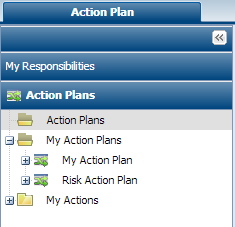
Desktops linked to Action Plans
This section presents desktops proposed to the different profiles concerned by action plans.
Desktop proposed to the action plan manager
This profile accesses the same commands as profiles "Action Owner" and "Action Plan Owner". It has an additional command to access follow-up reports of all action plans: Action Plan > Reports.
Desktop proposed to the action plan owner
The "Action Owner" can only access action plans of which he/she is owner, and their actions.
To access the list of action plans, the "Action Plan Owner" must:

Select the command
Action Plan > My Responsibilities > My Action Plans.
The "Action Plan Owner" can also access the list of his/her action plans and the actions he/she has created.
To access these lists, the "Action Plan Owner" must:
Select
Action Plan > My Responsibilities >Action Plans.
Folders displayed concern:
• All action plans created
• All action plans created by the connected person
• Actions created by the connected person.
Desktop proposed to the action owner
To access the list of action plans, the "Action Owner" must:
Select
Action Plan > My Responsibilities > My Action Plans.
The list of action plans concerning actions placed under the responsibility of the connected person is displayed in the edit area.
To access action plan properties:
1. Select the action plan.
2. Click Properties.
 For more details, see "Action Plan Follow-Up Reports".