Common Features
:
Using HOPEX
:
The MEGA Desktop
:
Navigating the EA desktop
:
Displaying Navigation Windows
Displaying Navigation Windows
To display a navigation window:
1.
In the desktop toolbar, click:
•
(
MEGA Web Front-End
)
from the
Display
tool group
•
(
MEGA Windows Front-End
)
2.
Select the required navigation window.
The selected navigation window appears.
Pictograms can appear alongside an object to indicate its status. For more details, see
"Object status indicators"
.
To refresh navigation windows display:
Press the <F5> key.
 from the Display tool group from the Display tool group from the Display tool group
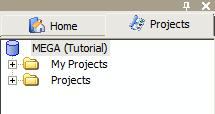
 Pictograms can appear alongside an object to indicate its status. For more details, see "Object status indicators".
 Press the <F5> key.