Customizing the Report Display
Modifying the report name
To modify the report name:
1. In the report Properties window, select the Characteristics tab.
2. In the Local name field, enter the report name.
3. Click Apply.
Specifying the report chapters to be displayed
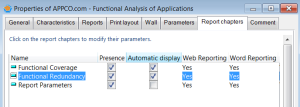
Report chapters vary according to report type. In the report results, you can show certain chapters and hide others.
To define the chapters to be displayed:
1. In the report Properties window, click the Report chapters tab.
2. In the Presence column, clear the chapters you want to hide.
By default, all of the chapters are displayed.
Automatically expanding the report chapter content on opening
In the report result, you must click each chapter title to display its content. You can define automatic opening of report chapters on report launching, so as to expand only the chapters you are interested in.
To expand a report chapter automatically on opening:
1. In the report Properties window, click the Report chapters tab.
2. Select Automatic display associated with the chapter in question.
Modifying report display options
The appearance of certain MEGA standard reports can be modified.
E.g.: you can present a stacked bar chart with a 3D effect.
When report presentation can be modified, a configuration button appears to the right of the report concerned.
To modify the display parameters of a report chapter:
1. Open the report concerned.
2. Click

associated with the chapter title you want to modify.
The Report Chapter Configuration properties window opens on the display parameters you can modify.
Updating Report Contents
MEGA reports are generated dynamically. If the characteristics of an object described in the report change, the report also changes.
To update an existing report:
1. Open the report concerned.
2. Click
Refresh 
to the right of:
• the report title to reload the complete page.
• the title that corresponds to the modified part, to reload part of the page only.
Modifying report options
You can, for example:
• hide export buttons on report chapters
• hide chapter comments
• hide help buttons
• define the Excel export format (.XLS or .XLSX)
• hide, in the pdf, the name of the person who created the report
To modify report options:
1. Select Tools > Options.
2. In the left tree, expand the Documentation folder.
3. Select Reports.
4. In the right pane of the window, modify the options.