Managing Your Contacts
Accessing your contacts management
To add a person to your contacts:
1. Connect to MEGA (MEGA Web Front-End).
2. In your
MEGA desktop, click
My Contacts 
.
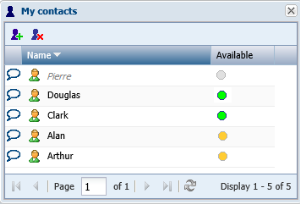
The My Contacts management dialog box appears.
In the Available field of each contact, a:
• green button

indicates that this contact is available
• yellow button

indicates that this contact is unavailable
• gray button

indicates that this contact does not wish to be contacted

Click the header of a column to sort your contacts by
Name or
Availability.
Adding a person to your contacts
To create a chat you must have added persons to your list of contacts.
To add a person to your contacts:
1. Access your contacts management dialog box.
2. Click
Add Contacts 
.
The add persons dialog box appears.
3. Select the person (you can select several).
4. Click OK.
The selected person is added to your list of contacts.
Deleting a person from your contacts
To delete a person from your contacts:
1. Access your contacts management dialog box.
2. Select the line of the person you wish to delete from your contacts.
3. Click
Remove Contacts 
.
The selected person is deleted from your list of contacts.