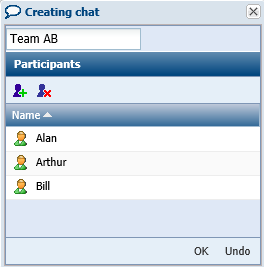
Creating Multiple Chats
You can directly create a multiple chat.
To create a multiple chat:
1. Display your current chats.
2. In the
Chats window, click
Create Chat 
.
3. (Optional) In the Enter Name field, enter the chat name.
Example: work group name: Team A.

If you do not specify this field, the chat default name is the chat participants names.
4. In the
Participants field, click
Add Participants 
.
The add persons dialog box appears.
5. Select the persons you want to add to your chat group.
6. Click OK.
Your multiple chat (chat group) is created.