Creating a Project with the Wizard
Use the project creation wizard to:
• select the method adapted to your needs.

A method represents a series of actions carried out to achieve a goal. A method is described by a series of phases.
• automatically initialize the structure of your project from phases specified in the method, associated resources and deliverables to be produced.
A phase is an operational activity that participates in production of the deliverables of the approach. It can be an activity related to production, verification, delivery, etc.
This wizard can be of particular value for deployment of projects in your enterprise.
To benefit from assistance in creation of your project:
1. Create a project.
A wizard starts. This lets you create the project menu tree and a project sequence diagram. It links the project and its sub-projects to the corresponding methods and phases.
2. Indicate a Name for the project and click Next.

If you do not wish to take advantage of assistance in creation of your project, click directly on
OK.
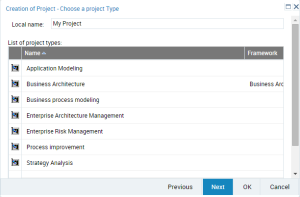
The next dialog box allows you to select a project type.
3. For example, select "Business Process Modeling".
You need not necessarily select a project type.
4. Click Next.
The next dialog box proposes a list of methods. This list is restricted depending on the previously selected project type.
5. For example, select "MEGA::Business Process Mapping".
6. Click OK.
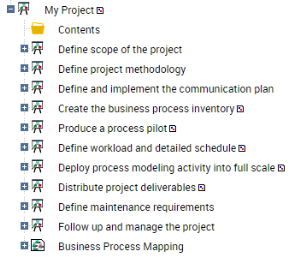
The wizard creates as many sub-projects as there are phases in the selected method. If a phase is supported by just one method, the sub-project structure is also created.
For each phase supported by several methods, the wizard automatically proposes the selection of possible methods.
When the project has been created, it contains as many sub-projects as there are phases in the method.