Connecting Concepts to Repository Objects
Consulting concepts associated with an object
In MEGA, you can consult concepts associated with an object:
• from the object pop-up menu.
• from the object properties dialog box.
From the object pop-up menu
To consult concepts associated with an object:

Right-click an object (in the navigator, in a diagram, etc.) and in the pop-up menu that appears, select
Concept.
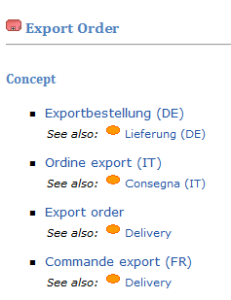
An HTML page is generated. It displays concepts associated with the object.
Display an example:
From the object properties dialog box
To access objects from the object properties dialog box:
1. Right-click an object (in the navigator, in a diagram, etc.) and select Properties in the pop-up menu.
2. In the object properties dialog box, select the General tab, then the Concepts subtab.
3. Right-click the name of the concept to be consulted and select Properties.
4. Select the Characteristics tab to view the text of the definition.
Connecting concepts to objects
To connect a concept to an object:
1. Right-click the object and select Properties.
2. Select the General tab, then the Concepts subtab.
3. Click the Connect icon.
The query dialog box appears.
4. Enter the name of your concept if required and run the query.
5. In the results list, select the concept that interests you and click OK.
Your object is then connected to this concept.
 You can create or connect a concept to an object from the object properties dialog box. For more details, see "Connecting concepts to objects" and "Creating Concepts".