Move to Staging
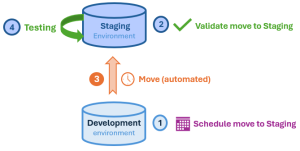
Move to Staging process:
1. Development environment: schedule the move to Staging.
2. Staging environment: validate the move to Staging.
3. (Automated) Move to staging.
 The process may take several hours.
4. Staging environment: test your Staging environment.
Scheduling a Move to Staging
From the Development environment, you can schedule a Move to Staging.
The scheduled Move to Staging must then be validated from the Staging environment to be executed.To schedule a Move to Staging:
1. Access the HAS console of your Development environment.
2. In the navigation bar, select Self-service > Move to Staging.
In the diagram, Development is not colored: a Move to Staging is not planned.
 Status and characteristics of the previous scheduled Move to Staging are shown. For example here, the previous Move to Staging was canceled (Status: StagingCanceled).
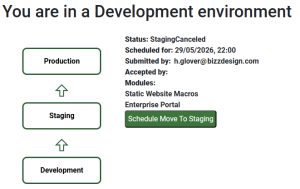
3. Click Schedule Move to Staging.
The calendar opens and shows any time slots already booked for other actions. These slots are unavailable.
 Hover over a booked slot for information on the action.
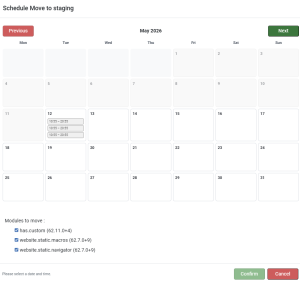
4. In the calendar, click the required date.
If needed, click  to view up to 12 months ahead and select a date.
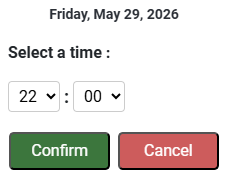
5. Use the drop-down menus (Hours:Minutes) to define the time.
(Default time: 09:00).
The time is defined in the platform local time.Time format: hh:mm where hh: 00-23 and mm: 00-55 (in 5-minute intervals).
6. Click Confirm.
The selected day and time are booked.
E.g.: Friday, May 29 at 22:00.

7. (If needed) Clear the module(s) you do not want to deploy yet.
By default all the modules are selected.
8. Click Confirm.
In the diagram, Development turns green, and its arrow towards Staging turns blue (proposal waiting for confirmation).
The arrow turns black (proposal validated) once the Move to Staging is validated from the Staging environment.The Move to Staging is scheduled and its characteristics are detailed:
• Status: ProposedMoveToStaging
• Scheduled for: scheduled date and time
• Submitted by: submitter
• Accepted by: <empty, waiting for approval>
Filled once the proposal is validated from the Staging environment.• Modules: list of modules concerned
The Move to Staging scheduling is complete and now requires validation in the Staging environment.

Validating a Move to Staging
From the Staging environment, you must validate the scheduled Move to Staging proposal for the move process to be performed.
If needed you can:
• modify the proposal (e.g.: non suitable date)
• cancel the proposal (e.g.: non suitable module list)
To validate a Move to Staging:
1. Access the HAS console of your Staging environment.
2. In the navigation bar, select Self-service > Move to Production.
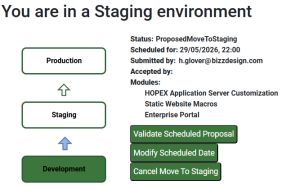
3. Click Validate Scheduled Proposal.
The Move to Staging is validated.
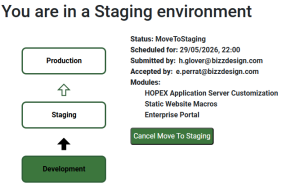
The Move to Staging process can take several hours to complete as an automatic Down Alignment process is first performed to synchronize the Staging environment with the Production environment current state.