Introduction to Workspaces
Workspace Types
Hopex gives access either to:
• a public workspace
• a private workspace, or
• read-only workspace
 See Working in Hopex.The workspace type is defined by the WET (Working Environment template) properties associated with the desktop.
Public workspace
In most management applications, the user cannot control the opening duration of his/her workspace: the end of a data entry stands for a definitive save of his/her work.
Private workspace
With private workspaces the user controls management of his/her workspace: opening, closing, dispatch, refresh.
Private Workspace Principle
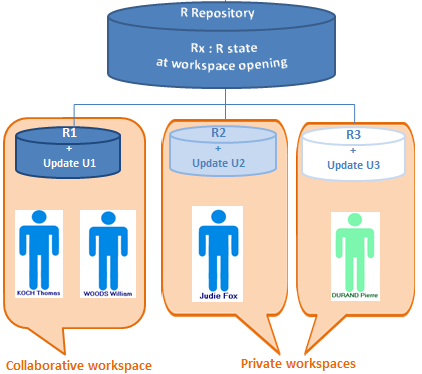
When a user connects to certain Web desktops, he/she opens a private workspace. This private workspace is a temporary view of the repository (repository snapshot) at the moment of user connection.
The user then sees:
• initial repository snapshot objects of his/her visibility scope
• updates he/she has executed on these objects.
The user decides when he/she wants to integrate his/her repository updates and make them visible to other users. To do this, he/she dispatches modifications.
The user controls opening duration of his/her private workspace.
The private workspace is open for each user on both his/her repository and on the system repository. A private workspace always exists on system repository even if the user is not using any of the system repository objects.Several users can have private workspaces open in parallel. In his/her private workspace, the user is independent of updates carried out simultaneously by other users in their respective private workspaces.
The user can also update his/her private workspace with the updates of other users. To do this, the user refreshes his/her private workspace.
See Refreshing Data.Hopex allows several users to work at the same time.