Post-Generation Configuration
Post-Generation Directory
 The following applies to on-premises users.
 After website generation, the related files are saved in a directory.
The default path is C:\ProgramData\MEGA\Hopex Application Server\<name of the HAS instance>.shadowFiles\website.static.content\<version number>\wwwroot. (On-Prem) If you have generated a multilingual website, there will be a folder per language.
Enabling External References
External references cannot be displayed when the static website is opened through the Enteprise Portal.
Further configuration is required to enable their display.
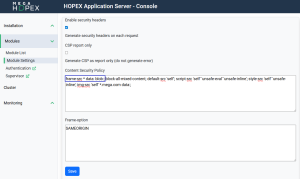
To enable external references:
1. Open the HAS Console.
2. Navigate to Modules > Module Settings.
3. Edit Http Security Headers.
4. In the Content Security Policy field, enter: frame-src * data: blob:;
5. Click Save.
External references to SharePoint
Additional configuration is required on your SharePoint server to enable the display of external references that redirect to SharePoint.