Connecting to Hopex Customizing Desktop
The Hopex Customizing desktop (Windows Front-End) is dedicated to Hopex product customization.
Profiles
Profiles dedicated to customization are:
• Hopex Customizer
The Hopex Customizer profile gives access to all Hopex Power Studio features. It enables to customize the following large sets of elements:
• Metamodel
• User Interfaces
• Documents
• Hopex Customizer Publisher
The Hopex Customizer Publisher enables to customize:
• Documents
 For detailed information regarding customization, see Hopex Power Studio documentation.
Accessing Hopex Customizing Desktop
You can start Hopex from your workstation:
• directly with Hopex installed on your machine.
• via a server or another machine to which you can connect.
When you connect to Hopex, you can:
• create a private workspace (if you do not already have one).
You can only have one private workspace open in the same environment.The private workspace is open for each user on both his/her repository and on the system repository. A private workspace always exists on system repository even if the user is not using any of the system repository objects.• resume work in your private workspace
To connect to Hopex Customizing desktop:
1. Double-click the Hopex.exe file  .
.
.The connection dialog box appears.
2. In the Identifier field, enter your identifier.
3. In the Password field, enter your password.
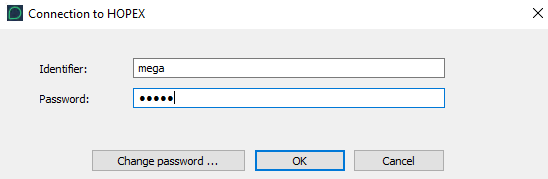
4. Click OK.
You are authenticated, your name appears in the Person field.
5. In the Repository field, select your work repository.
If you already have a private workspace open, the repository is automatically selected and this field is grayed. To change repository, you must first dispatch or discard your current private workspace.The drop-down menu  opens the list of repositories available in the environment. If you can access only one repository, this is automatically taken into account.
6. In the Profile field, click the arrow and select the Hopex Customizer profile.
If you have only one profile available, this is automatically taken into account.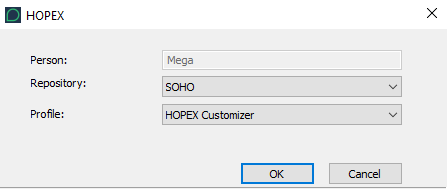
7. Click OK.
Your desktop appears.