6 API Use Principles
6.1 Coding: the right way
6.1.1 MegaRoot
You can use the Script Editor to write:
• scripts for testing
As these scripts are not stored in Hopex you can use global variables like MegaDB, MegaRoot or GetRoot to access objects in the repository. This coding way is dedicated to testing use only.
• scripts stored as files or macros in Hopex.
 |
Do not use MegaDB, MegaRoot, and Get Root in macro scripts stored in Hopex.
|
MegaRoot:
• represents the session you are connected with.
• gives access to Hopex repository data through GetGollection or GetSelection
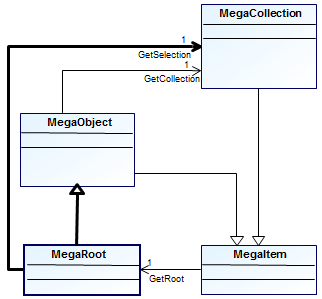
In the following sections, oRoot is:
|
• a session with which you are connected
• either set as a parameter of the function (e.g.: Main(oRoot)) or you call a function that has as a parameter the MegaObjects.
|
Here is sample code to access the MegaRoot from an object or a MegaEnvironment:
Set oRoot = object.GetRoot
Function Sub Main(oRoot)
‘code
End Sub
6.1.2 MegaFields
You must make reference to an object using its absolute identifier rather than its name: in this case the code is most highly optimized and resists renaming of the instance as well as change of language.
|
To write a query in a script you want to store in Hopex, use of MegaFields is mandatory.
|
An object in MegaField format is as follow:
“~xxxxxxxxxxxx[Object Name]"
Example for Project object:
~qekPESs3iG30[Project]"
Where:
• ~ indicates the start of the MegaField
• qekPESs3iG30 is the absolute Identifier of the object
• [Project] includes the object name
For more information on MegaFields see:
To enter Project MetaClass in MegaField format (i.e. with its absolute identifier) in your code:
1. From Explore menu bar, select Explore > object.
2. In the object list, select MetaClass.
3. In the right-pane pane select Project.
4. Click OK.
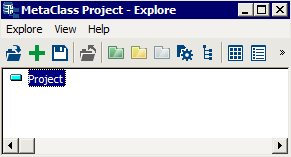
5. Right-click Project and select Copy and Paste it in your code.
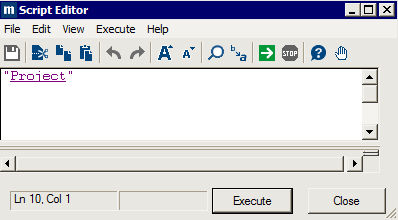
In Script Editor, "Project" includes Object name (Project) and its absolute identifier (qekPESs3iG30):
"~qekPESs3iG30[Project]"
6.2 Basic Operations
Objects are entered in their MegaField formats, which include their absolute identifiers (e.g.: "~qekPESs3iG30[Project]" instead of “Project”, see MegaFields section).
6.2.1 Creating an object
The following script enables creation of a project by applying the Create method to the Project object.
The name of the project created is indicated between brackets.
Example: Creation of a new project called “P1”.
|
VB Script
|
Set oRoot = object.GetRoot
oRoot.getCollection("~qekPESs3iG30[Project]").Create ("P1")
|
|
Java
|
mgRoot.getCollection("~qekPESs3iG30[Project]").create("P1");
|
6.2.2 Connecting operations to a project
Example: Creation of new operations that are connected to project "P1".
|
VB Script
|
Set oRoot = object.GetRoot
Set oProject = oRoot.getCollection("~qekPESs3iG30[Project]").Item("P1")
Set oOperations = oProject.GetCollection("~OsUiS9B5iiQ0[Operation]")
For i = 1 To 10
oOperations.Create "ope-" & i
Next
For Each oOperation in oOperations
oRoot.Print oOperation.getProp(“~Z20000000D60[Short Name]”)
Next
|
|
Java
|
MegaObject mgobjProject = mgRoot.getCollection("~qekPESs3iG30[Project]").get("P1");
MegaCollection mgcolOperations = mgobjProject.getCollection("~OsUiS9B5iiQ0[Operation]");
for (int j = 1; j <= 10; j++) {
mgcolOperations.create("ope-" + i);
}
for (MegaObject mgobjOperation : mgcolOperations) {
mgRoot.callFunction("~U7afnoxbAPw0[MessageBox]", mgobjOperation.getProp("~Z20000000D60[Short Name]"));
}
|
Code description:
Set oRoot = object.GetRoot
Set oProject = oRoot.getCollection("~qekPESs3iG30[Project]").Item("P1")
Retrieves the project called "P1" and its assignment to the variable "oProject".
Use the long name with “item” when manipulating namespaced objects. Example for an entity (DM) “titi” under the datamodel “DM1”:
oEnt =oRoot.GetCollection(“idabs[Entity (DM)]”).item(“DM1::titi”)
Set oOperations = oProject.GetCollection("~OsUiS9B5iiQ0[Operation]")
Retrieves all operations connected to the project "P1".
For i = 1 To 10
oOperations.Create "ope-" & i
Next
Creates ten operations (called "ope-1"..."ope-10") while adding them to the collection of operations connected to project "P1".
For Each oOperation in oOperations
oRoot.Print oOperation.getProp(“~210000000900[Name]”)
Next
Displays the names of the operations in the collection "oOperations".
6.2.3 Modifying a project name
Example: changing the name of project "P1" to "My Project".
|
VB Script
|
Set oRoot = object.GetRoot
Set oProject = oRoot.getCollection("~qekPESs3iG30[Project]").Item("P1")
oProject.GetProp(“~210000000900[Name]”) = "My Project"
|
|
Java
|
MegaObject mgobjProject = mgRoot.getCollection("~qekPESs3iG30[Project]").get("P1");
mgobjProject.setProp(“~210000000900[Name]”, "My Project");
|
Code description:
Set oRoot = object.GetRoot
Set oProject = oRoot.getCollection("~qekPESs3iG30[Project]").Item("P1")
Retrieves the project "P1" and assigns it to the variable "oProject".
oProject.GetProp(“~210000000900[Name]”) = "My Project"
Assigns the "My Project" value to the "Name" property of project "P1".
Note that Setprop is equivalent to getProp.
6.2.4 Displaying the names of all repository projects in a window
Example:
|
VB Script
|
Set oRoot = object.GetRoot
Set oAllProjects = oRoot.getCollection("~qekPESs3iG30[Project]")
For Each oProject in oAllProjects
sText = sText & oProject.getProp(“~Z20000000D60[Short Name]”) & vbCrLf
Next
MsgBox sText
|
|
Java
|
MegaCollection mgcolAllProjects = mgRoot.getCollection("~qekPESs3iG30[Project]");
String strText = "";
for (MegaObject mgobjProject : mgcolAllProjects) {
strText = strText + mgobjProject.getProp("~Z20000000D60[Short Name]") + "\n";
}
mgRoot.callFunction("~U7afnoxbAPw0[MessageBox]", strText);
|
Code description:
Set oRoot = object.GetRoot
Set oAllProjects = oRoot.getCollection("~qekPESs3iG30[Project]")
Retrieves all repository projects and assigns them to the variable oAllProjects.
For Each oProject in oAllProjects
sText = sText & oProject.getProp(“~210000000900[Name]”) & vbCrLf
Next
Obtains the names of each project inserting a line return between each ("vbCrLf"). After having browsed the collection of repository projects, the variable sText contains the names of all projects, each on a new line.
MsgBox sText
Displays in a window the text contained in sText variable.
6.2.5 Assigning an attribute value to several objects
Example:
|
VB Script
|
Set oRoot = object.GetRoot
Set oOperations = oRoot.getCollection("~qekPESs3iG30[Project]").Item("My Project"). getCollection("~OsUiS9B5iiQ0[Operation]")
For Each oOperation in oOperations
oOperation.Importance = "P"
Next
|
|
Java
|
MegaCollection mgcolOperations = mgRoot.getCollection("~qekPESs3iG30[Project]").get("My Project").getCollection("~OsUiS9B5iiQ0[Operation]");
for (MegaObject mgobjOperation : mgcolOperations) {
mgobjOperation.setProp("Importance", "P");
}
|
Code description:
Set oRoot = object.GetRoot
Set oOperations = oRoot.getCollection("~qekPESs3iG30[Project]").Item("My Project"). getCollection("~OsUiS9B5iiQ0[Operation]")
retrieves the operations connected to the "My Project" project and assigns this collection to the "oOperations" variable.
For Each oOperation in oOperations
oOperation.Importance = "P"
Next
assigns the internal value "P" (for "Principal") to the importance of each operation of the "oOperations" collection.
6.2.6 Retrieving a query result
Example:
|
VB Script
|
Set oRoot = object.GetRoot
set myprojects = oRoot.GetSelection~YYxh7XjGIzKE[~YYxh7XjGIzKE[My projects]]("Select ~qekPESs3iG30[Project] where Not ~KsUiCCB5i0)1[Diagram] ")
For each oproject in myprojects
oRoot.print oproject.GetProp("~Z20000000D60[Short Name]")
Next
|
|
Java
|
MegaCollection mgcolAllProjects = mgRoot.getSelection("Select ~qekPESs3iG30[Project] where Not ~KsUiCCB5i0)1[Diagram]");
String strText = "";
for (MegaObject mgobjProject : mgcolAllProjects) {
strText = strText + mgobjProject.getProp("~Z20000000D60[Short Name]") + "\n";
}
mgRoot.callFunction("~U7afnoxbAPw0[MessageBox]", strText);
|
Code description:
Set oRoot = object.GetRoot
set myprojects = oRoot.GetSelection("Select ~qekPESs3iG30[Project] where Not ~KsUiCCB5i0)1[Diagram] ")
assigns the query result to the "myProjects" variable (this query retrieves all projects not described by a diagram).
For each oproject in myprojects
oRoot.print oproject.GetProp("~210000000900[Name]")
Next
displays the names of all projects in "myProjects" collection.
6.2.7 Using a MegaObject or MegaCollection
The MEGA APIs provide the user with two basic types:
the MegaObject type, which enables access to a MegaObject.
the MegaCollection type, which enables access to a collection of objects.
An instance is an object, such as a business process, class, database, etc.
A MegaObject enables access to characteristics of an object instance.
Use the GetProp function, using the name as parameter.
|
VB Script
|
MyName = MyObject.Name
MyName = MyObject.GetProp("~210000000900[Name]") ' equivalent to the previous line
|
|
Java
|
String strMyName = mgobjMyObject.getProp("~210000000900[Name]");
|
From a MegaObject, you can access each MegaCollection connected to an object instance, using the GetCollection function. If "myProject" is an object corresponding to a project instance, to access the collection of operations linked to this project, the code is as follows:
|
VB Script
|
Set myOperations = myProject.GetCollection("~OsUiS9B5iiQ0[Operation]")
For each anOperation in myOperations
do .... Next
|
|
Java
|
MegaCollection mgcolOperations = mgobjMyProject.getCollection("~OsUiS9B5iiQ0[Operation]");
for (MegaObject mgobjOperation : mgcolOperations) {
....
}
|
The VBScript keyword For Each enables browsing of the content of a MegaCollection. However, other forms of search are allowed using the Item implicit method for the collection.
If a numeric parameter is passed to Item, this is treated as an ordinal position. As the standard VB Count function returns the number of items in the collection, you can write:
|
VB Script
|
numOperations = myOperations.Count
For i = 1 to numOperations
Set anOperation = myOperations.Item(i)
Set anOperation = myOperations(i) ' same thing
Next
|
|
Java
|
int iNumOperations = mgcolOperations.size();
for(int j = 1; j<= iNumOperations; j++)
{
MegaObject mgobjOperation = mgcolOperations.get(j);
}
|
6.2.8 Filtering and refining the getCollection API to retrieve objects
The getCollection API enables to retrieve a collection of objects.
You can add parameters to the getCollection API:
@SKIPCONFIDENTIAL: confidential objects are filtered and are not included in the collection.
@TAKECONFIDENTIAL: deactivates the @SKIPCONFIDENTIAL filter. This command may be necessary if it was defined as default behavior with MegaRoot.SetDefault.
@IGNOREMETAFILTER: non-visible metamodel objects (filtered by keys or profile) are not included in the collection.
@-ACTIVATEMETAFILTER: deactivates the @ACTIVATEMETAFILTER filter.
@ACTIVATECONCRETEFILTER: repository objects with non-visible concrete MetaClass (filtered by keys or profile) are not included in the collection.
@-ACTIVATECONCRETEFILTER: deactivates the @ACTIVATECONCRETEFILTER filter.
Refining parameters are:
@INHERITED: adds objects inherited for the MetaAssociationEnd in the collection. This parameter also applies to GetSelection.
@-INHERITED: deactivates the @INHERITED parameter.
@INHERITING: adds inheriting objects for the MetaAssociationEnd in the collection.
@-INHERITING: deactivates the @INHERITING parameter.
@INHERITANCE: adds inherited or inheriting objects for the MetaAssociationEnd according to its type. This parameter also applies for GetSelection, but only for inherited objects.
@-INHERITANCE: deactivates the @INHERITANCE parameter.
@SUBSTITUTED: when used alone, includes in the collection only those objects substituted for the MetaAssociationEnd. This parameter is inactive for GetSelection.
@-SUBSTITUTED: deactivates the @SUBSTITUTED parameter.
Example:
To get objects inherited from an object use the following API:
oTAb.getCollection("source Object MegaField]", "@INHERITED")
For example, to get the objects inherited from a column:
oTAb.getCollection("~qdFzhq1Bkur1[Column]", "@INHERITED")
Note that the corresponding Erql code is:
Select [Column] Inherited Where [Table].[Name] Like "#MyTable#"
6.2.9 Using Set in a VB Script code
Assignment of MegaObjects by command Set results in return of an object.
numOperations = myOperations.Count
Set anOper = myOperations.Item(1) 'Returns an object
Print myOperation.Item(1) 'Returns a value
Use of the Set command leads to reservation of memory space on your workstation. The use of highly recursive functions or tables of high volume can lead to saturation of this memory.
To avoid this type of problem, take care to free memory spaces reserved by unused objects.
This freeing can be carried out by assigning the value Nothing to your objects (for more details, see Microsoft documentation on VB Script language).
Example:
Set myproject= ...
...
Set myProject = Nothing
|
Use of the "Explicit Option" option is recommended, avoiding use of global variables by explicitly declaring variables in functions (global variables do not operate in Hopex Web Front-End context).
|
6.2.10 Accessing MEGA API Public Objects
Public objects of Hopex are available for external VB Script code, Java code or VBA.
Public objects
Use of MEGA APIs form an external program is based on the three following public components:
MegaApplication
This component enables administration of Hopex from an external program. It is not accessible from an open session. In particular, it cannot be used to its full extent from the script editor. This is due to the fact that this component totally controls the Hopex session (connection, repository opening) and is not designed to collaborate with the Hopex workspace (Windows Front-End). When this component is activated, it is not possible to open a Hopex workspace (Windows Front-End) or Hopex Administration.exe.
In VB script, it can be created by the Basic function CreateObject ("Mega.Application").
MegaCurrentEnv
This component enables access to the current Hopex session. Unlike the MegaApplication component, it is used to collaborate with the Hopex workspace. It enables determination of whether the Hopex session is open (using the IsSessionOpen function) and therefore enables an external program to use Hopex without explicitly connecting.
However, when the GetRoot function of this component is called when the Hopex workspace is not open, it takes charge of the Hopex session by proposing a specific connection dialog box. In this case, it is no longer possible to open the Hopex workspace, since the connection this proposes could be in conflict with that opened from this component.
This component can be used from the script editor and gives access to the current session.
This is to be avoided |
In VB script, it can be created by the Basic function: CreateObject("MegaRepository.CurrentEnv").
To obtain the MegaApplication public object from a MegaCurrentEnv object use the MegaCurrentEnv.Site function.
|
MegaToolkit
This component groups utility functions developed for use indistinctly in internal or external mode. In this way, it does not make reference to characteristics of the session in progress.
In VB script, it can be created by the CreateObject ("Mega.Toolkit") Basic function.
6.2.11 Accessing public objects from another MegaObject
This is recommended |
To obtain the MegaCurrentEnv public object from a MegaRoot object use the MegaRoot.CurrentEnvironment function.
|
This is recommended |
The MegaToolkit public object can be obtained from the following objects:
• MegaCurrentEnv, using the MegaCurrentEnv.Toolkit function,
• MegaApplication using the MegaApplication.Toolkit function.
|
6.3 MEGA API Methods and Functions
Hopex proposes methods and functions relating to MegaObjects and MegaCollections.
6.3.1 Functions on MegaCollections
Accessing a Hopex repository
Any MegaObject (instance or collection) can access the repository to which it belongs by means of the GetRoot function.
|
VB Script
|
Dim Root
Set Root = MyObject.GetRoot
|
|
Java
|
MegaRoot mgRoot;
mgRoot = mgobjMyObject.getRoot();
|
Collections of isolated objects
Collections obtained from the repository via the name of a MetaClass enable access to all instances of this MetaClass in the repository.
|
VB Script
|
Dim MyProjects
Set oRoot = object.GetRoot
Set MyProjects = oRoot.getCollection("~qekPESs3iG30[Project]")
' contains all projects in the repository.
|
|
Java
|
MegaCollection mgcolMyProjects = (MegaCollection) mgRoot1.invokePropertyGet("~qekPESs3iG30[Project]");
|
You can also select objects using the GetSelection function.
|
VB Script
|
Dim MyProjects
Set MyProjects = Root.GetSelection _
("Select ~qekPESs3iG30[Project] where Name like 'A#'")
|
|
Java
|
MegaCollection mgcolMyProjects = mgRoot.getSelection("Select ~qekPESs3iG30[Project] where Name like 'A#'");
|
GetSelection can be called from any instance.
The GetTypeID function returns the identifier of the MetaClass of instances in the collection.
Collections of slave objects (connected)
Collections obtained from an instance other than the root are association collections. This is the way to obtain a collection of objects that are connected to an instance by a given association.
The original instance can be retrieved with the GetSource function. The GetTypeID function returns the identifier for the MetaAssociationEnd used.
|
VB Script
|
Set theSource = myOperationCollection.GetSource
Set theDuplicate = theSource.GetCollection _
(myOperationCollection.GetTypeID)
|
|
Java
|
MegaObject mgobjSource = mgcolOperations.getSource();
MegaCollection mgcolOperationsDuplicate = mgobjSource.getCollection(mgcolOperations.getTypeID());
|
The objects contained in such collections are slave objects. They can be used to access either the characteristics of the linked object or those of the MetaAssociation traversed.
|
VB Script
|
For each anOperation In myOperationCollection
' Name is an attribute of the operation, order is a link attribute
oRoot.Print anOperation.GetProp("~210000000900[Name]"), anOperation. GetProp("~410000000H00[Order]")
Next
|
|
Java
|
String strText = "";
for (MegaObject mgobjOperation : mgcolOperations) {
// Name is an attribute of the operation, order is a link attribute
strText = strText + mgobjOperation.getProp("~210000000900[Name]") + " " + mgobjOperation.getProp("~410000000H00[Order]") + "\n";
}
mgRoot.callFunction("~U7afnoxbAPw0[MessageBox]", strText);
|
The GetTypeID function when used on a slave object returns the identifier of the MetaAssociationEnd used. It returns the same value as GetTypeID for the collection that provided access to the instance.
A slave object establishes a relation between three sub-objects:
• The source object, which can be obtained using the GetSource function
(which is the equivalent function for the collection).
• The target object, which can be obtained using the GetTarget function.
• The association object, which can be obtained using the GetRelationship function.
The slave object is therefore a shortcut to the target and association objects. The above code can also be written as:
|
VB Script
|
For Each Ope In myOperationCollection
oRoot.Print Ope.GetTarget.GetProp("~210000000900[Name]"), Ope.GetRelationship. GetProp("~410000000H00[Order]")
Next
|
|
Java
|
String strText = "";
for (MegaObject mgobjOperation : mgcolOperations) {
// Name is an attribute of the operation, order is a link attribute
strText = strText + mgobjOperation.getTarget().getProp("~210000000900[Name]") + " " + mgobjOperation.getRelationship().getProp("~410000000H00[Order]") + "\n";
}
mgRoot.callFunction("~U7afnoxbAPw0[MessageBox]", strText);
|
The target and source objects are not slave objects. The GetTypeID function returns the identifier for the object type and therefore is similar to GetClassID. The example below lists the "brothers" of a slave object (including itself).
|
VB Script
|
For Each Brother In _ MySlave.GetSource.GetCollection(MySlave.GetTypeID)
oRoot.Print Brother.GetProp("~210000000900[Name]")
Next
|
|
Java
|
String strText = "";
MegaObject mgobjMySlave = mgcolOperations.get(1);
for (MegaObject mgobjBrother : mgobjMySlave.getSource().getCollection(mgobjMySlave.getTypeID())) {
strText = strText + mgobjBrother.getProp("~210000000900[Name]");
}
mgRoot.callFunction("~U7afnoxbAPw0[MessageBox]", strText);
|
Sorted collections
It is possible to obtain a collection that is sorted by one or more characteristics of the instances in the collection.
|
VB Script
|
Set MyOperations = MyProj.Operation ("~410000000H00[Order]", "~ Z20000000D60[Short Name]")
Set MyOperations = MyProj.Operation (1, "~ Z20000000D60[Short Name]")
Set MyOperations = MyProj.Operation _
(1, "~510000000L00[Creation Date]", -1, "~410000000H00[Order]")
|
|
Java
|
MegaObject mgcolMyProj = mgRoot.getCollection("~qekPESs3iG30[Project]").get(1);
MegaCollection mgcolMyOps = mgcolMyProj.getCollection("Operation", "~410000000H00[Order]", "~ Z20000000D60[Short Name]");
mgcolMyOps = mgcolMyProj.getCollection("Operation", 1, "~Z20000000D60[Short Name]");
mgcolMyOps = mgcolMyProj.getCollection("Operation", 1, "~510000000L00[Creation Date]", -1, "~410000000H00[Order]");
|
A positive value preceding the criterion indicates a sort in ascending order, a negative value means descending order.
Sort is in ascending order by default.
Searching a collection
The implicit Item function is used to find a particular instance in a collection. In addition to the name (local if applicable), the identifier, or the sequence number, an instance can be found by one of its characteristics:
|
VB Script
|
Set MyInstance = MyOperations("Type Operation", "A")
Set MyOcc = MyOperations(TypeOpeID, "A") ' identical to above,
' if TypeOpeID contains the identifier of the characteristic
|
If several instances match, the first one is returned.
It is also possible to find a specific position by using an object directly.
|
VB Script
|
Set MyOcc = MyOperations(MyOtherOcc) ' equivalent to
Set MyOcc = MyOperations(MyOtherOcc.GetID)
|
6.3.2 Functions and methods on MegaObjects
A function executes processing and returns a result. Unlike a method, parameters specified for a function must be placed between brackets.
Modifying an instance
To modify an instance, the GetProp method must be applied:
|
VB Script
|
MyOperations.Comment = _
"Here is the comment for my operation..."
MyOperations.GetProp("~f10000000b20[Comment]") = _
"Here is the comment for my operation..."
|
|
Java
|
mgobjMySlave.setProp("~f10000000b20[Comment]", "Here is the comment for my operation...");
|
Disconnecting a slave object
To disconnect a slave object:
Apply the Remove method to a collection of slave objects specifying the name, identifier, or object to be connected.
|
|
The object is no longer usable after this operation. |
||
|
VB Script
|
MyCollection.Remove MyObject
|
||
|
Java
|
remove();
|
Deleting an Object
To delete an object:
Apply the Delete method to the object.
|
|
The object is no longer usable after this operation. Be careful while using Delete on a collection, as items are shifted and the use of “for each” might not work properly. |
||
|
VB Script
|
MyObject.Delete ""
|
||
|
Java
|
delete("");
|
Connecting an object
To connect an object:
Apply the Add method to a collection of slave objects, specifying the name, identifier, or object to be connected.
|
VB Script
|
MyCollection.Add MyObject
MyCollection.Add MyObject.GetID
MyCollection.Add "Test"
"Test" is the name of an existing instance.
|
|
Java
|
mgcolMyCollection.add(mgcolMyObject);
mgcolMyCollection.add(mgcolMyObject.getID());
mgcolMyCollection.add("Test");
|
Creating an object
To create an object, apply the Create method to a collection of objects obtained from the root (a simple create) or from a collection of slave objects (create/ connect).
• Without a parameter, the function creates an instance that has as its name the class name followed by a counter.
• A parameter of type String specifies the name (local if applicable) of the instance.
For any other attribute, you must specify the attribute name (or identifier), followed by the value to be assigned.
|
VB Script
|
MyCollection.Create
MyCollection.Create "Name1"
MyCollection.Create "Name2", "Comment", _
"Comment of Name2"
|
|
Java
|
mgcolMyCollection.create();
mgcolMyCollection.create("Name1");
mgcolMyCollection.create("Name2", "Comment", "Comment of Name2");
|
Accessing a new object
A new object created using an Add or Create method can be accessed as follows:
|
VB Script
|
set MyNewObj1 = MyColl.Create("Name1")
set MyNewObj2 = MyColl.Add ("Test")
|
|
Java
|
MegaObject mgcolMyNewObj1 = mgcolMyCollection.create("Name1");
MegaObject mgcolMyNewObj2 = mgcolMyCollection.add("Test");
|
Accessing the MetaClass of an object or collection
The GetType function allows an object or collection to be considered as an instance of a given MetaClass.
Used from a MegaObject, the GetType function enables considering an object as a function of the MetaClass given as parameter.
|
VB Script
|
MyOrgProc.GetType("BPMN Process").explore runs the explorer from an object of the Organizational Process concrete MetaClass, considering it as an object of the "BPMN Owner Element" MetaClass.
|
|
Java
|
mgobjMyOrgProc.getType("BPMN Process").invokeMethod("Explore");
|
Used without a parameter, operator GetType enables consideration of the current object as an element of the concrete MetaClass to which it belongs.
Used from a MegaCollection of objects of different concrete MetaClasses, operator GetType allows you to obtain a collection restricted to instances of the MetaClass specified as parameter.
|
VB Script
|
oCollection.GetType("Sequence flow").explore runs the explorer on objects of the collection belonging to the "Sequence flow" MetaClass
|
|
Java
|
mgcolCollection.getType ("~jsV6VsHL7vJ0[Sequence Flow]").invokeMethod("Explore");
|
If no object of the collection inherits the MetaClass given as parameter, operator GetType returns nothing. No error is generated.
Accessing object attributes
The GetAttribute function enables access to an object of MegaAttribute type to obtain type characteristics, translations if these exist, as well as the attribute value in its different formats.
|
VB Script
|
Print myobj.GetAttribute("Operation Type")
' Displays the attribute internal value
Print myobj.GetAttribute("Operation Type").Value("Display")
'Displays the attribute value in the language used
|
|
Java
|
mgRoot.callFunction("~U7afnoxbAPw0[MessageBox]", mgcolMyObj.getProp("Operation Type"));
// Displays the attribute internal value
mgRoot.callFunction("~U7afnoxbAPw0[MessageBox]", mgcolMyObj.getAttribute("Operation Type").getValue("Display"));
// Displays the attribute value in the language used
|
Attribute Format
You can obtain an attribute value in a given format. The default format is ASCII.
Available formats are: "Internal", "Ascii", "External", "Display". This is used as follows:
|
VB Script
|
Print MyOcc.GetProp("Operation Type", "External")
|
|
Java
|
mgRoot.callFunction("~U7afnoxbAPw0[MessageBox]", mgobjOcc.getProp("Operation Type", "External"));
|
A default format can be specified on the instance using the SetDefault function.
|
VB Script
|
MyInstance.SetDefault("Display")
|
|
Java
|
mgobjOcc.setDefault("Display");
|
When defined for the root, the default format is applied to all instances.
|
VB Script
|
Root.SetDefault("Display")
|
|
Java
|
mgRoot.setDefault("Display");
|
6.3.3 Functions on MegaCurrentEnvironments
For examples, see:
oRoot.CallFunction("~91tmJFSUQL6I[Compilation]", MetaModel, TechnicalData, Permission, DeleteOldCompilationResults, SaveCurrentCompilationResults)
sResult = oRoot.CallFunction("~91tmJFSUQL6I[Compilation]", MetaModel, TechnicalData, Permission, DeleteOldCompilationResults, SaveCurrentCompilationResults)
6.3.4 Methods on a Reporting Datamart
From Hopex Administration application (Administration.exe) you can schedule a synchronization on all the repositories for all their Reporting Datamarts.
Using APIs, you can launch and particularly schedule actions on a specific repository, for a specific Reporting Datamart, and without connecting to the Administration application.
6.4 Summary of Functions
6.4.1 Functions on MegaItems
Functions available on MegaItems, ie. on all objects:
|
VB Script
|
Java
|
|
CallFunction
|
public Object callFunction(Object name, Object... arg);
|
|
CallMethod
|
public void callMethod(Object name, Object... arg);
|
|
GetMethodID
|
public Object getMethodID(Object name);
|
|
GetNature
|
public String getNature(String format);
|
|
GetRoot
|
public MegaRoot getRoot();
|
|
GetSource
|
public MegaObject getSource();
|
|
GetTypeID
|
public Object getTypeID();
|
|
SetDefault
|
public void setDefault(String defaultValue);
|
6.4.2 Functions on MatrixContext
Functions available on MatrixContext:
|
VB Script
|
Java
|
|
GetRoot As MegaRoot
|
public MegaRoot getRoot();
|
|
GetMatrixTypeId As Variant
|
public Variant GetMatrixTypeId();
|
|
GetMatrixId As Variant
|
public Variant GetMatrixId();
|
|
GetClassId As Variant
ID of the Row MetaClass or Column MetaClass
|
public Variant GetClassId();
|
|
InsertItem(ItemID) As Boolean
Row or column item insertion. Returns true if the insertion succeeded, else false (object already in or not compatible).
|
public boolean InsertItem(ItemID)
|
|
GetContainer As Object
Returns the container of the matrix. Can be Nothing.
If the matrix is used in a Property Page context, it returns the AttributeControl corresponding to the matrix.
|
public Object getContainer (Object name);
|
|
|
|
6.4.3 Functions on MegaCollections
Functions available on MegaCollections:
|
VB Script
|
Java
|
|
AdviseRegister
|
public MegaAdviseToken adviseRegister(MegaAdviseTarget target);
|
|
Add
|
public MegaObject add(Object objectID);
|
|
Count
|
public int size();
|
|
Create
|
public MegaObject create();
|
|
Insert
|
public void insert(Object toInsert);
|
|
Item
|
public MegaObject get(Object index);
|
|
Remove
|
public void remove(Object toRemove);
|
6.4.4 Functions on MegaObjects
Functions available on MegaObjects:
|
VB Script
|
Java
|
|---|---|
|
Delete
|
public void delete(String options);
|
|
GetClassID
|
public Object getClassID();
|
|
GetCollection
|
public MegaCollection getCollection(Object vcolID, Object... sortCriteria);
|
|
GetCollectionID
|
public Object getCollectionID(Object name);
|
|
GetID
|
public Object getID();
|
|
GetProp
|
public String getProp(Object propID);
|
|
GetPropID
|
public Object getPropID(Object name);
|
|
GetRelationship
|
public MegaObject getRelationship();
|
|
GetType
|
public MegaObject getType(Object name);
|
|
GetTarget
|
public MegaObject getTarget();
|
|
Item
|
public Object item();
|
|
Remove
|
public void remove();
|
|
SetProp
|
public void setProp(Object propID, String value);
|
6.4.5 Functions on MegaAttributes
Functions available on MegaAttributes:
|
VB Script
|
Java
|
|---|---|
|
Value
|
Value public String getValue();
|
|
DefaultFormat
|
|
|
TextType
|
public Object getTextType();
|
|
DescriptionObject
|
public MegaObject getDescriptionObject();
|
|
GetAsPrivateProfile
|
public MegaPrivateProfile getAsPrivateProfile();
|
|
Translate
|
public MegaAttribute translate(Object language);
|
|
SourceObject
|
public MegaObject getSourceObject();
|
|
TestValue
|
public String testValue(Object value, String format);
|
|
Status
|
public int getStatus();
|
|
GetAttributeValue
|
public Object getValue(String format);
|
6.4.6 Functions on MegaRoot objects
Functions available on MegaRoot objects:
|
VB Script
|
Java
|
|---|---|
|
BaseCanClose
|
public boolean isClosed();
|
|
BaseClose
|
public void close();
|
|
ContextObject
|
public MegaCOMObject contextObject(String Name);
|
|
CurrentEnvironment
|
public MegaCurrentEnvironment currentEnvironment();
|
|
GetBaseInfo
|
|
|
EnterPrivilege
|
public Object enterPrivilege(String description);
|
|
LeavePrivilege
|
public void leavePrivilege();
|
|
TryPrivilege
|
public Object tryPrivilege(String[] description);
|
|
GetSelection
|
public MegaCollection getSelection(String request, Object... sortCriteria);
|
|
GetExcecutionStatus
|
public int getExecutionStatus();
|
|
GetObjectFromID
|
public MegaObject getObjectFromID(Object ident);
|
|
GetSystemRoot
|
|
|
GetClassDescription
|
public MegaObject getClassDescription(Object classID);
|
|
GetCollectionDescription
|
|
|
MegaCommit
|
public void megaCommit();
|
|
MegaRollback
|
public void megaRollback();
|
|
print Print
|
public void print(Object value);
|
|
SetOpenToken
|
public void setOpenToken(String token);
|
|
SetUpdater
|
|
6.4.7 Functions on MegaCurrentEnvironment
Functions available on MegaCurrentEnvironment:
|
VB Script
|
Java
|
|---|---|
|
GetCurrentSnapshotDate
GetUserOption
GetCompilationStates
GetCurrentLoginHolder
GetCurentUserId
|
public Date getCurrentSnapshotDate();
myroot.currentEnvironment.getUserOption
|
6.5 MEGA Operators
6.5.1 Operator types
The operator types are:
• "Compound": enables specification of behavior on MetaAssociations.
Examples of "Compound" type operators  :
:
:o Owner
o Ownership
o NameSpace
o Propose
o Reference
• "Method": implements methods and functions available for APIs. These methods and functions can relate to a MegaObject, a MegaCollection, a MetaClass or to all MetaClasses.
Examples of "Method" type operators  :
:
:o Edit
o Explore
invokeMethod("Explore")
o IsAvailable
o Open
o SaveAs
o Excel Import
o Excel Export
• "Atomic": used for basic commands of Hopex.
Examples of "Atomic" type operators :
:o Abbreviate
o Connect
o Create
o Disconnect
o Description
o Implicit
o Import
o Read
o Delete
o Translate
To access all operators, search from the "_Operator" MetaClass.
6.5.2 Creating an operator
An operator is a standard function that may be called either from the root or from a specific MetaClass.
To create the operator:
1. Open the VB Script editor and enter the following code:
[_Operator].Create("MyOperator").explore
[Macro].Create("MyOperator.Macro").explore
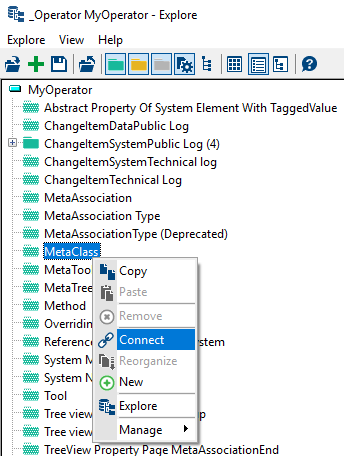
2. Access to the operator properties and connect the macro you have just created to your operator:
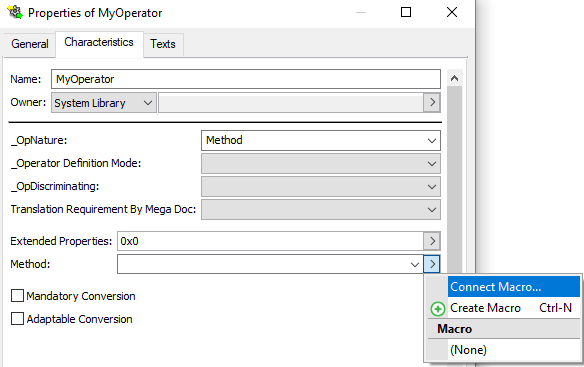
If your operator is specific to a MetaClass, connect the MetaClass to the operator through the MetaClass MetaAssociationEnd.
3. Navigate to the macro implementing the operator.
For example: MyOperator.Macro.
4. If the operator needs to be written in:
o Java: specify on the macro properties, the java class factory in the “_ObjectFactory” and the “dispatch” mode in the “SystemComponent” attribute.
o VB Script: edit the macro.
• If the operator applies on a MegaObject, the following methods must be implemented
|
VB Script
|
The macro must implement the following functions:
‘specify the number of arguments that will be passed to the operator: here 3.
Function InvokeArgCount() As Integer
InvokeArgCount = 3
End Function
‘Method called when the operator is called with 3 arguments. The first argument is the object on which the call is made (megaobject).
Sub InvokeOnObject(Obj as MegaObject, sFileName As String, strReportFilename as String , controlComponent As MegaObject)
End Sub
|
|
Java
|
The factory must define a class containing the following functions:
public class MyOperator {
/**
* Specifies how many parameters are expected
* if not defined, the method called has only one argument : the megaobject on which the call has been made
*/
public int InvokeArgCount() {
return 3;
}
/**
* function called with the 3 arguments. The first argument is the object on which the call is made
*/
public void InvokeOnObject(final MegaObject mgObjectToExport, final String strFilename, String strReportFilename, final MegaCOMObject controlComponent)
{
//procedure called when the operator is called
}
}
|
Note that the InvokeOnObject method may return a value both in Java or VB Script. In that case, the java function must be defined with a return value and the VB Script method must be defined as a Function.
|
VB Script
|
'if you want your method to return a value, use
Function InvokeOnObject(Obj As MegaObject)
End Function
|
|
Java
|
//return a number
public int InvokeOnObject(final MegaObject mgObject)
{
}
|
• If the operator applies on MegaRoot, the following methods must be implemented. If you need to add additional arguments, you need to implement InvokeArgCount to specify the number of arguments.
|
VB Script
|
Sub InvokeOnRoot(oroot As MegaRoot)
End Function
'if you want your method to return a value, use
Function InvokeOnRoot(oroot As MegaRoot)
End Function
|
|
Java
|
public void InvokeOnRoot(final MegaRoot mgRoot)
{
}
Or if you want your method to return a value, use
//return an integer
public int InvokeOnRoot(final MegaRoot mgRoot)
{
}
|
• If the operator applies on a collection. In that case, the method to be implemented is InvokeOnCollection. If you need to add additional arguments, you need to implement InvokeArgCount to specify the number of arguments.
|
VB Script
|
Sub InvokeOnCollection(Coll As MegaCollection)
End Sub
'if you want your method to return a value, use
Function InvokeOnCollection(Coll As MegaCollection)
End Function
|
|
Java
|
public void InvokeOnCollection(final MegaCollection lst )
{
}
Or if you want your method to return a value, use
//return an integer
public int InvokeOnCollection(final MegaCollection lst )
{
}
|