Data Usage Reports
Use of information held by a container
For the object selected as input (eg: a package), the report displays:
• the information that it holds (eg: classes or data views)
• the areas that use this information, with which access rights
• the applications that use the domains (via data stores that are used to declare them on the applications, application systems, application service or microservice), and through which components (in read-only or read/write).
A report template displays this information in the form of a dendrogram, another in the form of a table.
|
Settings
|
Object types
|
|---|---|
|
Subject
|
Database
Business dictionary
Package
Data type packages
|
Use of information in a domain - Table
This report template displays as a table the use of information of an information domain (business, logical, physical).
For the object selected as input (an area), the report displays:
• the information used (eg: classes or data views in the case of an application data domain), with which access rights.
• in which applications the selected domain is used (via data stores that are used to declare them on the applications, application systems, application service or microservice), and through which components (in read-only or read/write).
|
|
|
|---|---|
|
|
|
Information Map Usage
This report displays a table on the use of information in an information map.
The input parameter is an information map that can group together one or more area(s).
This report displays
• the areas and the data that it uses, with the access rights for this data.
• in which systems (applications, application systems or microservices) these areas are used and with which components of these systems, specifying the access mode (read-only or read/write).
A report template displays this information in the form of a dendrogram, another in the form of a table.
Use of information
The root object of the report consists of an item of information (concept, class, data view, table, etc.). For this root, the report displays:
• the areas that use this information, with which access rights
• in which systems (applications, application systems or microservices) these areas are used and with which components of these systems, specifying the access mode (read-only or read/write).
|
|
|
|---|---|
|
|
|
Use of information of the domains of a container
For the object selected as input (a container), the report displays:
• the areas owned
• the information used by the domains, with which access rights
• the systems that use these areas and the access mode of the components of these systems (read-only or read/write)
|
|
|
|---|---|
|
|
|
Term Definitions (Report DataSet)
 A Report DataSet is a data table created using repository objects, on which instant reports can be generated. Hopex Data Architecture provides different types of Report DataSets.
 This type of Report DataSet has a list of terms as input parameter.
Using selected terms, you can, for example, create a "matrix" type instant report that presents the list of concepts that use the terms in question.
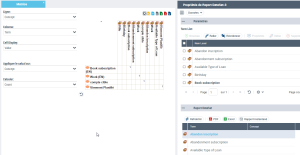
To create an instant report for this type of Report DataSet:
1. Create a "Term definition" Report DataSet type.
2. Open the properties of the Report DataSet.
3. Display the Data page.
4. (If needed) In the Parameters section, click Add and select the input parameters, here the terms.
5. (If needed) In the Report DataSet section, click Refresh.
6. In the Report DataSet section, select Instant Report.
7. Select the required instant report type, here a matrix.
8. Click OK.
Business Dictionary x Concept Matrix (Report DataSet)
A concept can be referenced by one or more business dictionaries.
This Report DataSet has a list of business dictionaries as input. It is used to create a "Matrix" type business report that lists the concepts referenced in the selected business dictionaries.
To create an instant report for this type of Report DataSet:
1. Create a "Business Dictionary Matrix x Concepts" type Report DataSet.
2. Open the properties of the Report DataSet.
3. Display the Data page.
4. (If needed) In the Parameters section, click Add and select the input parameters, here the terms.
5. (If needed) In the Report DataSet section, click Refresh.
6. In the Report DataSet section, select Instant Report.
7. Select the required instant report type, here a matrix.
8. Click OK.