Actions on Several Objects in a List
In your Hopex desktop, the objects in a list are useful entry points to perform actions on several objects of the same type.
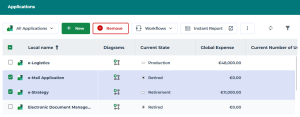
 The objects selected in a list are highlighted in bold.
When you select more than one object from the list, additional actions are available.
 Click
Click  to access hidden actions.
Using the menu bar of a list of objects, you can perform common actions on several selected objects.
Icon | Action on the list of objects | For more details, see: |
|---|---|---|
 | Create an object matching the object list | |
 | Delete the selected objects from the Hopex repository | |
 | Launch a mass workflow transition on the selected objects | |
 | Run an instant report on the selected objects | |
 | Export the selected objects in Excel format | |
 | Display/Hide the filters on the columns |