Using a Flow Scenario Sequence Diagram
 To use Scenario of Application Flows Diagrams, open the Options window and check that IT Architecture > Activate Flow Scenario Sequence Diagrams option is activated.
This type of diagram can be built for an application system, an application environment, an application, an application, an IT service or a microservice.
For each use context, you create flow scenario sequence diagrams. A flow scenario sequence diagram presents the same exchanges between system elements, highlighting their chronology. The elements in the sequence scenario are represented in the diagram by lines.
A flow scenario sequence diagram contains:
• Lines which define service interaction participants: instances of applications, services or interfaces.
• Different types of messages exchanged between participants.
• Advanced functions that enable concise description of several execution sequences.
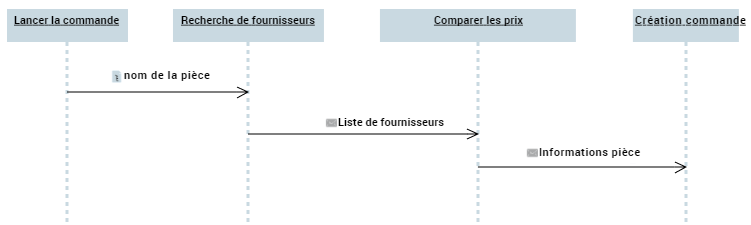
This diagram describes the operation of the "Order Unreferenced Parts" use case:
When a purchase request is entered in the user interface, the name of the part is received by the "Find Suppliers" service, which draws up the list of suppliers offering the requested part.
The "Compare Prices" service looks for the lowest-priced product and sends information to the "Order Amount Calculation" service.
When the order amount has been established, a final "Issue Purchase Order" service sends the order via the interface.
Creating a flow scenario sequence diagram
To create an application environment scenario sequence:
1. Open the Diagram page of the application environment that interests you and click New.
2. In the dialog box, select Scenario of Application Environment Flows - Application Environment Scenario Sequence Diagram.
Instances of applications, IT services or interfaces

Message instance