Creating a Process Category diagram
You can create a Process Category diagram using two different modes.
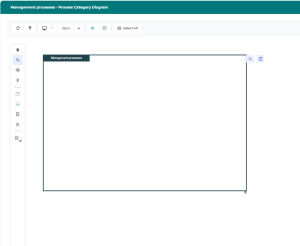
• Graphical mode: with this mode, you can easily display the objects already created and linked to your Process Category.
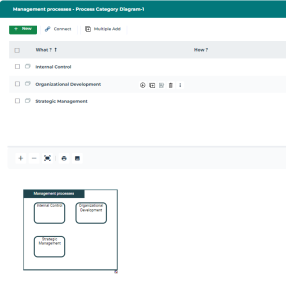
• Tabular mode: with this mode, you can easily add multiple new objects in your diagram.

The user can choose the opening mode of a diagram if the option
Choice of diagram opening mode is set to
Ask the user through Main Menu > Settings > Options> Compatibility > Diagram.
Creating a Process category diagram in graphical mode
To create a Process Category diagram in graphical mode:
1. In the Process Category list, click the
Create Diagram 
button related to the selected Process Category.
The diagram creation window opens.
2. Select Process Category Diagram > Create diagram in graphical mode.
An empty Process Category diagram appears in graphical mode.
3. To complete the Process Category diagram, you can:
• Import existing objects
• Add new objects
To import existing objects:

Click
Add sub-categories 
then
Reorganize.

To add / connect manually, click the following icons from the object inserting bar:
• Direct lower rank
Process Category 
• Processes 
• Value chain 
• Application Used 
If you do not see certain objects, activate their display by using the
Views and details
icon.
Creating a Process Category diagram in tabular mode
To create a Process Category diagram in tabular mode:
1. In the Process Category list, click the
Create Diagram button related to the selected Process Category.
The diagram creation window opens.
2. Select Process Category Diagram > Create diagram in tabular mode.
The diagram creation window in tabular mode opens.
3. To complete the Process Category diagram, you can:
• Add one or several objects with the New and Multiple Add buttons.
• Add an existing object via the Connect button.
When you create an object, it appears in the table (upper part of the screen) and in the diagram preview (bottom part of the screen).