Managing Recommendations
 Recommendations are used within the framework of Hopex Internal Audit.
Accessing recommendations
To access your recommendations:
 In the navigation bar, select My tasks > Recommendations.
Recommendations are classified according to their status:
• Recommendations
• Delayed recommendations
Implementing recommendations
You may be required to manage recommendations following testing activities or production of the final audit report.
As a recommendation owner, you may:
• create actions whose objective is to implement recommendations.
• specify a progress percentage for the actions
For more information on recommendations within the framework of Hopex Internal Audit: see Implementing Recommendations.
Creating an action within the framework of a recommendation
Submitting an action plan (consisting of recommendations)
Viewing recommendation widgets
Recommendations by status and year
This bar chart displays recommendations:
• By year
• By status (each color corresponding to a distinct status)
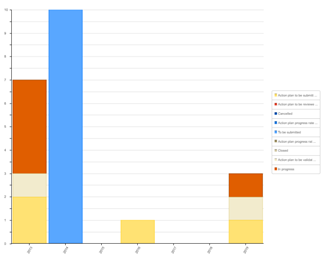
Recommendations by status and audit
This bar chart displays recommendations:
• By audit
• By status (each color corresponding to a distinct status)
Recommendation Dashboard
This dashboard displays action breakdown by progress for all “in progress” recommendations you are responsible for.
• Delayed
• On Time