Audit Plan and Audit Follow-Up
Hopex Internal Audit enables follow-up of audit plans according to different criteria.
Following-up the Progress of Audits in an Audit Plan
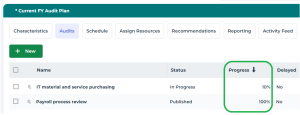
In the properties of an audit plan, the Audits page enables to view the progress of audits.
It corresponds to the percentage of audit activities which have been closed for each audit of the audit plan.
Displaying Audit Plan Follow-Up Reports
Several reports enable audit plan execution follow-up.
To access audit plan reports:
1. Open the audit plan properties.
2. Select the Plan Reports page then one of the following reports:
• Supervision
• Workload and resources
• Resources allocation
• Gantt report
• Expenses
Supervision
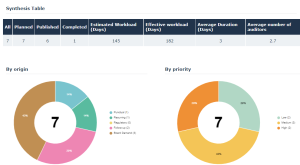
Workload and resources
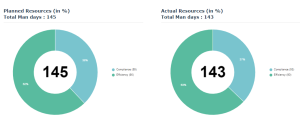
Resources allocation

Gantt report
Expenses
Closing Audit Plans
When all audit activities are completed, the audit director can close the audit plan.
When closing the audit plan, the following audits are closed:
• ongoing audits
• audits which have not been canceled