Supervising Audits
This section applies to the lead auditor.
The lead auditor must validate the work of auditors via the activity workflow.
He/she can then monitor their work and assure audit follow-up. To simplify the task, reports enabling audit check are available on each audit.
Audit Check Reports
To access audit check reports:
 In the properties of an audit, select the Reports > Supervision page.
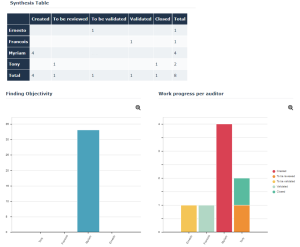
Three reports appear:
• Findings Objectivity: to ensure objectivity of findings, audit evidence must be provided.
The figure displayed indicates the percentage of findings with at least one attachment.
The figure displayed indicates the percentage of findings with at least one attachment.
• Work progress by auditor
• Auditor activity summary table
Time Sheet Follow-up Reports
Reports enable follow-up of auditor time sheets.
To access the Reports tab:
Click Audit > Times & Expenses > Timesheet Follow-up. You can create three types of reports:
Time sheets by auditor
Time sheets by audit
Incomplete days by auditor
Audit Expense Reports
To view expenses of an audit/test:
In the properties of an audit, select the Reports page, then Work Mission Expenses.Pie diagrams present breakdown of expenses:
• by resource (auditor)
• by category:
• Food and Beverages
• Lodging
• Transportation
To view the list of expenses associated with a diagram sector:
Right-click in a sector.Corresponding results appear as a list in the lower part of the window.