Synchronizing an ArchiMate Diagram Elements
ArchiMate® concepts are mapped with Hopex EA building blocks enabling compatibility and continuity with other models. Thus, an ArchiMate Business Process can reference a Process which can be described in a BPMN diagram, so that the user can navigate from an overview ArchiMate diagram putting a process into its EA context, to a more detailed BPMN description.

For more details on
Hopex for the ArchiMate® Framework implementation, see
The HOPEX MetaModel for ArchiMate.
The synchronization consists in mapping an ArchiMate element created in the context of an ArchiMate diagram with an EA building block.
The Hopex for the ArchiMate® Framework solution provides two types of element:
• The ArchiMate® EA Elements which can be associated to a repository object.
• The Flow type Relationships whose sender and receiver are synchronized with the ITPM “flows” between applications.
Two possibilities are provided to synchronize an ArchiMate element:
Using Properties for Synchronization
The Characteristics properties of ArchiMate® EA Elements enable the mapping of shared inventory objects.
For more details on ArchiMate® EA Elements implementation in
Hopex, see
ArchiMate Elements.
For more details on the ArchiMate® Elements in
Hopex, see
Concepts mapping.
To map an ArchiMate® Device to an Hopex IT Architecture Device, for example:
1. Open the Characteristics properties of the Device element.
2. From the EA building block field, select Connect.
The Connecting dialog box opens.
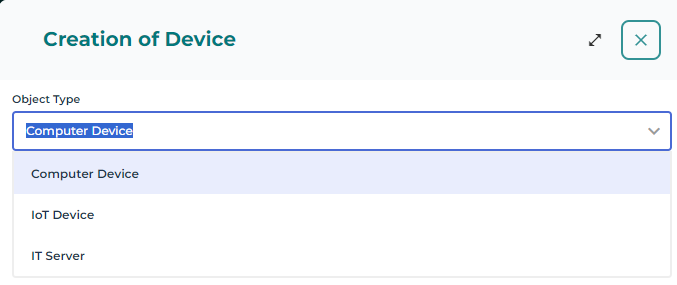
3. Select the type of Device.
4. Enter the Name of the New Device.
5. Click OK.
The device appears in the diagram.
For simple mapping EA Elements, you must enter the new
Name and click
Next to create a new inventory object.
Synchronizing Elements from an ArchiMate diagram using the synchronization wizard
From an ArchiMate diagram, you can synchronize all the elements of the diagram which have a possible mapping to Hopex objects, or create new corresponding HOPEX objects of the relevant type.
This enables to reference existing Building Blocks in HOPEX inventories used by other solutions (e.g., Processes from HOPEX Business Process Analysis or Applications form HOPEX IT Business Management).
To synchronize the elements of a diagram:
1. Open the diagram in edit mode.
2. Click the Synchronize button.
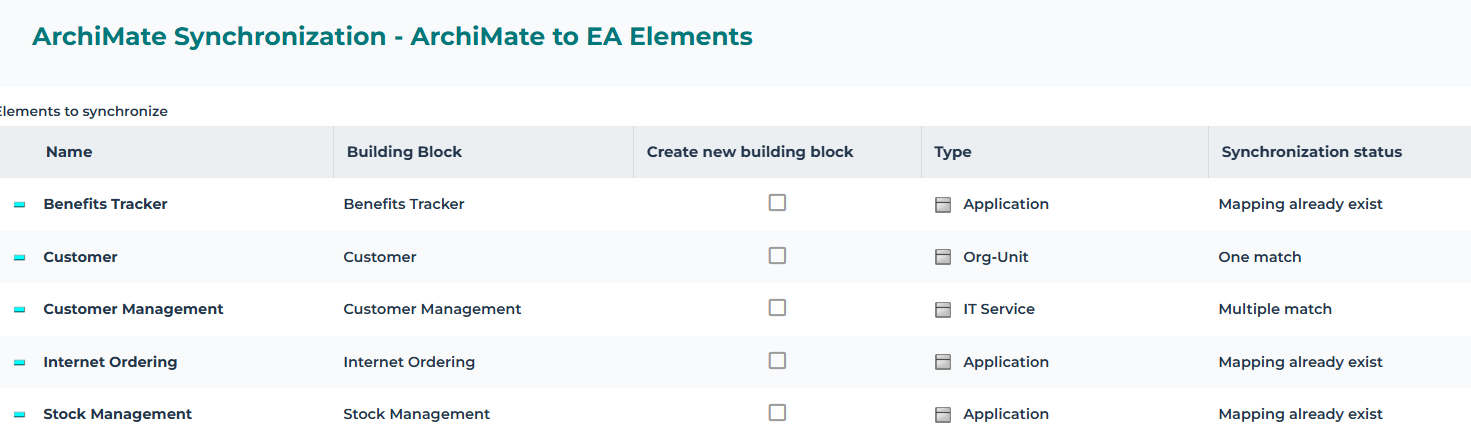
A window opens and shows a table of all the elements of the diagram that can be synchronized.
3. Click the Building Block box of the element that interests you.
In a case of a “multiple” mapping, you may choose the type of the associated repository object. For more details, see
Mapping an ArchiMate® EA Element to an HOPEX object in properties.
• If the item is already mapped or synchronized, "Mapping already exists" or "Element synchronized" message appears in the Synchronization status cell.
• If no item of the default type with the element name is found, then "No match" is displayed in the Synchronization status cell.
• If one item of the default type with the element name is found, then then "one match" is displayed in the Synchronization status cell.
• If many items are found, click on the Building Block cell to select the appropriate one (the context is given by the owner / long name).
• When you want to create a new building block of a different type than the default one, check the "Create new building block" box and select the desired type in the Type cell.
4. Click Next.
5. The list of Flow type Relationships with synchronized sender and receiver is displayed.
6. An EA flow is created between the repository EA objects if the box in the ArchiMate Relationships Synchronization column is checked.
7. Click OK.
Once ArchiMate® EA Elements are mapped to Hopex Building Blocks, the navigation to these objects is possible via the ArchiMate® EA Elements properties.
Reaching these objects describing diagrams can be achieved:
• through the Diagrams properties of the referenced objects,
• Using Diagrams containing objects feature from:
• the ArchiMate® EA Element Diagrams properties
• using the object pie menu in a diagram preview.
Access to Referencing ArchiMate® Element(s) Report
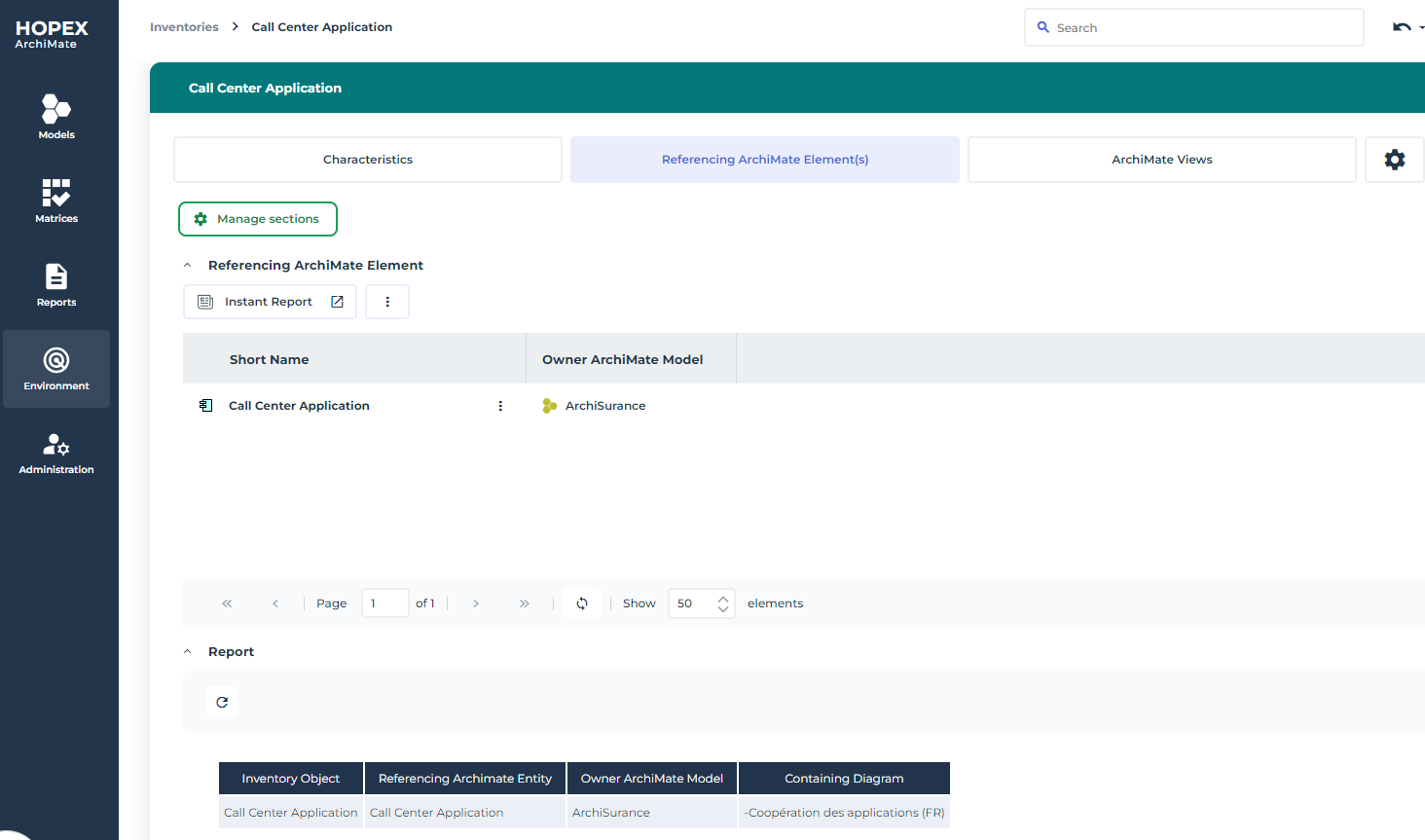
The Referencing ArchiMate Element(s) report, enabling a view of the use of a component across the various ArchiMate® models.
To access to this report:
1. Select the navigation menu Environment > Inventories.
2. Select a type of objects.
Application (Application Component), for example.
3. Select an object and open the Referencing ArchiMate Element(s) property page.
The report is computed and displayed.