Obsolescence Risk and Remediation
You can visualize the risk of technological obsolescence for each technology, as well as for technologies associated with a portfolio or a selection of applications.
For each technology, the Obsolescence Risk indicator is available in the properties Overview page and is calculated on the basis of the technology's lifecycle dates. See below for computation mode.
Obsolescence risk computation
The Obsolescence Risk indicator value is a function of the interval time between the current date and the technology's end-of-support date (or extended end-of-support date). The shorter the interval, the higher the risk.
For users having subscribed to the IT-Pedia catalog, notes related to the dates provided by the catalog are taken into account in the computation.
Default computation (without IT-Pedia)
Technology end-of-life date, support end date, and extended support end date are taken into account to compute risk obsolescence. To define the date when a technology becomes obsolete, Hopex identifies the most recent date among the three dates.
If no end-of-life, support end, or extended support end date is found, the Obsolescence Risk indicator value is “Unknown”.
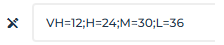
By default, time values associated to obsolescence risk levels are as follows:
Table of time intervals associated with obsolescence risk levels
Interval current date/obsolescence date | Obsolescence risk level | Color of the indicator |
|---|
Less than or equal to 0 | Obsolete | |
Less than or equal to 12 months | Very high | |
Between 12 and 24 months | High | |
Between 24 and 30 months | Medium | |
Between 30 and 36 months | Low | |
More than 36 months | Very Low | |
Unknown | Unknown | Gray |

Risk levels are computed based on months and not days (which separate the current date from the obsolescence date). Therefore, whether you are at the beginning or end of the month, the risk level remains the same.
The Hopex administrator can customize the time intervals assigned to each risk level.
For exemple, he can define a “Very high” risk level for 15 months instead of 12.
To customize computation parameters at the risk level:
1. Connect as Hopex Administrator.
2. Open the options of the environment.
3. In the left pane of the window, expand Hopex Solutions> IT Portfolio Management.
4. In the right part, in the Parameter for computation of risk of obsolescence field, edit the values as appropriate.
Computation with IT-Pedia
In absence of dates, IT-Pedia provides explanatory notes:
• "Not Applicable” means the product does not have related date because the product is such that no date would be relevant per manufacturer (ex. extended support). Eracent anticipates the product will never have such a date.
• "Not Published" means the product was researched and Manufacturer/Publisher did not publish this date among other dates.
• "Not Yet Announced" means the product has been researched and the Publisher has not released or provided any public EOL data. Eracent anticipates a date to be eventually announced.
• "Pending Research" means that research by Eracent to confirm the date is in progress.
The following is taken into account in the computation, in order of priority:
1. End-of-life Date.
If the end-of-life note is “Indefinite”, then the obsolescence risk is “Very low”.
2. End-of-support dates.
If there is no end-of-support, extended end-of-support or end-of-life date, but one of the following values provided by IT-Pedia:
• "Expired": the Obsolescence Risk is “Very high”
• "Not Applicable": the Obsolescence Risk is “Very low”
• "Not yet announced": the Obsolescence Risk is “Very low”
• "Not published": the Obsolescence Risk is “low”
• "Pending Research": the Obsolescence Risk is “Unknown”.
IT-Pedia note of end-of-support/extended end-of-support | IT-Pedia note of end-of-life | Obsolescence risk level |
|---|
None | "Indefinite" | Very Low |
"Expired" | None | Very high |
"Not applicable" | None | Very Low |
"Not yet announced" | None | Very Low |
"Not published" | None | Low |
"Pending Research" | None | Unknown |
Date | None | Computation rule result |
3. The interval between the current date and the support end date.
See above in “Default computation”, Table of time intervals associated with obsolescence risk levels.
The Hopex Administrator can customize the level of risk associated to the "Not applicable", "Not yet announced", "Not published"and "Pending Research” values provided by IT-Pedia.
To edit the level of risk associated to IT-Pedia values:
1. Connect as Hopex Administrator.
2. Open the options of the environment.
3. In the left pane of the window, expand the Tools > Data Exchange > Import > IT-Pedia folders.
4. In the right frame, modify the values of interest.
Technology Obsolescence Remediation report
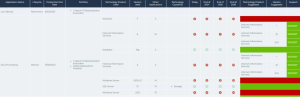
For a portfolio of applications or a selection of applications, you can analyze the obsolescence risks of the technologies associated with the applications. The Technology Obsolescence Remediation report shows, for the applications in the portfolio, the list of software technologies, their support state for the coming years and the potential new versions available to remedy their obsolescence.
To open this report:
1. Click the Reports menu.
2. To the right of the edit area, click the Create a report button.
3. Search for the “Technology Obsolescence Remediation” report.
The report appears in the edit area.
4. Select the report type and click Create a report.
The report creation wizard opens.
5. Select the relevant application portfolio.
6. Click Preview then Continue.
7. Name the report.
8. Click Save and open.
The report displays:
• portfolio applications
• the technologies associated with the applications, with:
• The current version
• its life cycle for the current year and the next two years
• in the event of obsolescence, the proposed technology and version
• other applications concerned by the technologies analyzed