Technologies
The Technologies navigation menu in the Viewer desktop brings together information about the technologies used across the information system.
It provides access to technology inventories, their distribution across portfolios, associated vendors, and various analytical reports, offering a clear view of the organization's technology landscape.
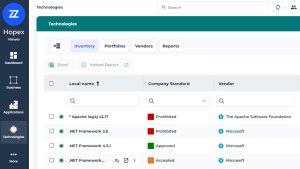
This menu provides access to technology cards.
 The card of an object is meant to provide an overview of the essential properties that identify the object.
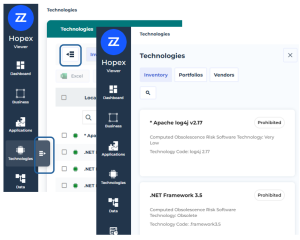
 For more details, see Card of an Object.
Inventory
This page lists technologies and displays the following information in columns:
• the company standard: indicates the organization policy regarding the use of technology.
• the vendor
Suppliers identify external partner organizations involved in the company's operations.• the end of support/extended support
• the associated business software
A software technology is a basic component necessary for operation of business applications.For more details on technologies, see Software Technology Inventory.
Portfolios
This page displays a hierarchical view of the technology portfolios and the technologies associated with them.
A portfolio enables representation of the investments of an enterprise (or department) necessary to carry out changes required to achieve strategic objectives.Vendors
This page lists technology vendors and displays their description.
Reports
This page provides reports which illustrate:
• Technology usage (pie chart displaying the number of applications in production using technologies).
• Technology state (bar chart illustrating the state of technologies (envisioning, emerging, confirmed, obsolete) with time projection).
• Vendor dependency (pie chart grouping the technologies by vendor).
• Technology rationalization (bar chart of technologies envisioned, emerging, confirmed, obsolete).