Interface Elements (Viewer Desktop)
The Hopex general interface is described in “Platform - Common Features”.
 The Viewer desktop offers a simplified interface compared with other Hopex desktops. Some actions described in the general documentation, particularly those accessed through pop-up menus, are available through alternative interactions, such as hovering over an object.
See in particular, in The Hopex Desktops:
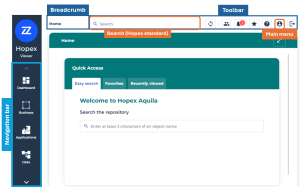
Navigation menus
The navigation menus are organized by Enterprise Architecture business topics and provide access to the main objects in the repository:
• Business
• Applications
• Data
• Technologies
The More menu provides access to reports and an inventory of objects, enabling you to explore the repository in greater depth.
See:
Toolbar
The toolbar in the upper-right corner is common to all Hopex desktops.
See Toolbar.
Undo/Redo buttons are not available because the Viewer profile is read-only.Main menu
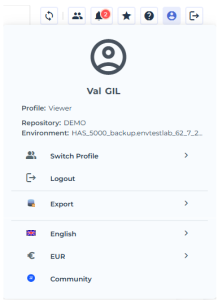
The Main Menu  allows you to:
• switch profiles without logging out
See Switching Profile.• log out
• use the export wizard to export objects.
• change data language.
• access the community
Hopex standard search bar
The search bar enables you to search for EA-related objects. Several search domains are available, including:
• Main Objects (business objects)
• All Objects
The search bar does not provide access to Advanced Search, which is not available to the Viewer profile.

For more details, see Full-text Search.
Easy search, available in the central area of the homepage, enables you to search for main objects by name and does not provide filtering by search domains.