Homepage of the EA Desktop
The homepage of the EA desktop is structured into four parts:
• Header contains Priorities, which are the main strategic themes of interest to users.
 These can be defined in the Administrator Administration> Methodological Domains menu.
• My Scope provides useful indicators on the repository content. See below.
• Quick Access displays useful shortcuts:
• Recently viewed: last objects and diagrams accessed by the user
• Favorites: user favorites and shared favorites
• Actions: quick access to the creation of architecture elements.
• My favorite report: displays the user-defined or administrator-predefined report, which can be used as an entry point into the repository.
My Scope provides useful indicators on application assets. Clicking the indicator takes you to all the corresponding objects. There are three groups of indicators:
• Application governance
• Risk and compliance
• Inventory
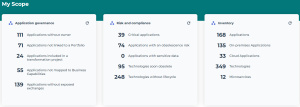
Application governance
This section lists the following objects:
• Applications without owners: displays a list of applications to which you can connect responsible users.
• Applications not linked to a portfolio: displays a list of applications to which you can connect portfolios.
• Applications without exposed exchanges: applications that neither receive nor send flows.
• Applications included in a transformation project: these are the applications that are part of the deliverables of a transformation project.
• Applications not mapped to business capabilities: displays the list of applications which don't cover any business capability.
To ask application owners to connect applications under their responsibility to business capabilities:
1. Click the indicator Applications not mapped to business capabilities.
2. Select the applications in question and click the Request Application Update button.
A notification is sent to owners.
Risk and compliance
This section lists the following objects:
• Critical applications: all applications that cover a strategic business capability, in other words, whose Business Value is "Significant”.
This is the business value defined during the last business capability assessment. • Applications with an obsolescence risk: applications whose risk of obsolescence is between “Medium” and “Very high”.
The risk of application obsolescence corresponds to the highest risk of the technologies linked to it. See the obsolescence risk in the Overview of a technology.• Applications with sensitive data: applications linked to data stores containing data (classes, MD entities, data views) or Concepts in the "Sensitive data" category.
See also: Defining the Data Used by an Application.• Technologies soon obsolete
• Technologies without lifecycle
Inventory
The Inventory section displays the number of following objects:
• Applications
• On-premises Applications
This is the type of application installation. See Application identification> Cloud Computing.• Cloud Applications
This is the type of application installation. See Application identification> Cloud Computing.• Technologies
• Microservices