The NPV-1 Report Template
Report Parameters
The NPV-1 report template uses three parameters:
• The Architecture parameter, which is the architecture to be analyzed. This is the sole parameter that enables the retrieval of all the root projects of the architecture.
• The Projects parameter, which is optional. This parameter is used to reduce the scope of the study. The selected projects must of course belong to the architecture being analyzed. If no project has been selected, all the projects of the architecture are taken into account.
• The Column Projects parameter. This is also optional parameter. This parameter enables the creation of a table with different sets of projects for rows and for columns.
The NPV-1 Project Hierarchy Chapter
The project hierarchy chapter shows the structure of the projects implemented in the analyzed architecture.
The Project composition diagram is displayed to show the structure of the projects. This diagram is followed by a table of the project hierarchy. The Root project is displayed with its comment and its sub-projects. The deliverables and comments of the sub-projects are also displayed.
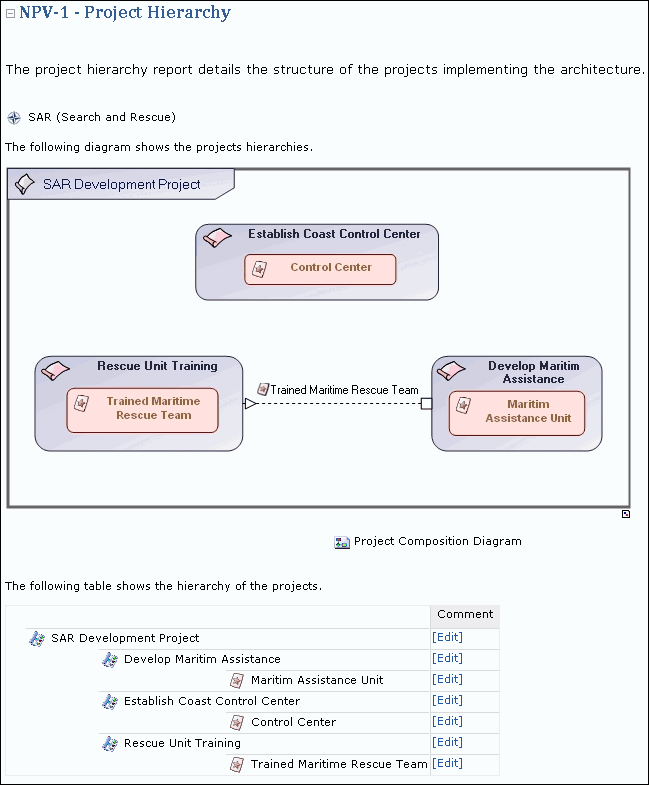
Example of a Project Hierarchy Report
The NPV-1 Project Dictionary Chapter
The project dictionary report provides a list of all the projects of the architecture in alphabetical order.
This list is presented in table with the short name, long name and comment of each project.
A paragraph is then dedicated to each project. In this paragraph, the deliverables expected of the project are listed. The project composition diagram is also displayed.

Example of a Project Dictionary Chapter
The NPV-1 Hierarchical Project Dependencies Chapter
Projects are sometimes dependent.
The Hierarchical Project Dependencies chapter shows the dependencies of projects in the architecture. This report allows you to use the subset parameters to generate appropriate sized tables. The projects are displayed according to the defined project hierarchy.
The report information is displayed in a matrix with project trees as rows and column headers.
Dependencies between two projects are represented by icons. An icon appears in the matrix between projects linked by a dependency. You can add or remove dependencies by clicking in the different cells of the matrix.
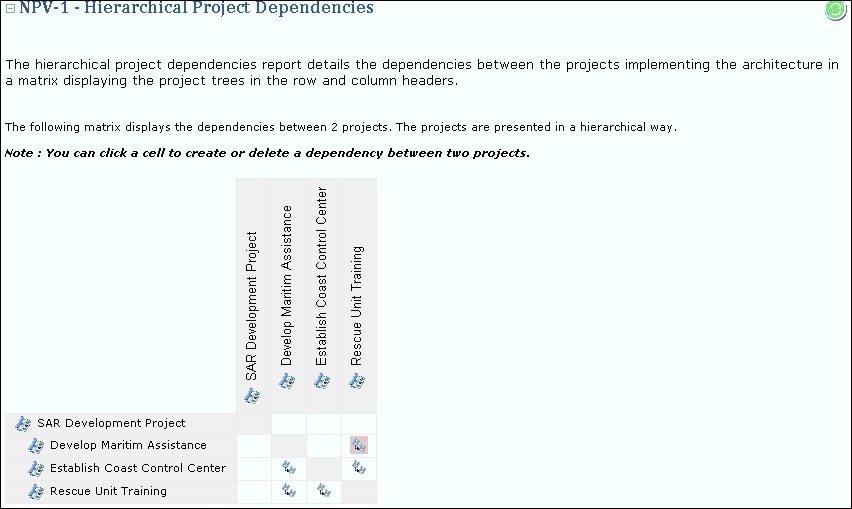
Example of a Hierarchical Project Dependencies Chapter
The NPV-1 Project Dependencies Chapter
The Project Dependencies chapter also shows the dependencies of projects in the architecture, however, project hierarchy is not displayed.
The dependencies are represented as icons in a matrix with projects as rows and column headers. An icon appears in the matrix between projects linked by a dependency. You can add or remove dependencies by clicking in the different cells of the matrix.