Modifying Image Format
You can generate Web site diagram images in the following formats:
• PNG
• Bitmap
• SVG
• JPEG
To modify the default format of generated images:
1. In the workspace, select Tools > Options.
2. Expand the Documentation folder and select Web Sites.
3. In the right pane, in Generated images format field, select the required format.
4. Click OK.
SVG format
Images generated in SVG (Scalable Vector Graphics) format are of higher quality than those generated in other formats, particularly when using zoom (distortion).
To view images generated in this format, you must install a specific viewer. The SVG Editor field indicates the SVG viewer URL address. It will be automatically downloaded when viewing the image. If you prefer to use another viewer, change the URL address.
Using SVG format in generated pages
You can zoom in a diagram by activating one of the commands in the pop-up menu.
To zoom in:
 Click Zoom in.
To zoom out:
Click Zoom out.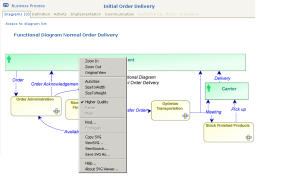
The zoom is carried out from the drawing center point.
To zoom on part of a drawing:
1. Position the cursor on the part of the drawing concerned and press the <Ctrl> key.
The pointer changes shape: 
2. Right-click the mouse button and select the zoom type.