Showing Metamodel Names
You can show metamodel characteristic and link names and object type names in different languages.
Showing a characteristic name
To show a characteristic name:
1. In the tree, select the icon corresponding to the object characteristic and simultaneously press the <Ctrl> key.
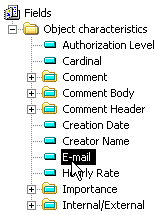
2. Holding the <Ctrl> key down, drag the characteristic name to the text area.
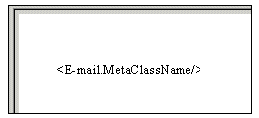
<Name.MetaClassName> appears in the text area. In the report (MS Word), "Name" appears in the current language.
Showing the object type
To show an object type name:
1. In the "Object Characteristics" folder, select "Object MetaClass Name" and simultaneously press the <Ctrl> key.
2. Holding the <Ctrl> key down, drag-and-drop "Object MetaClass Name" to the text zone.
<Object MetaClass Name/> appears in the text area. In the report (MS Word), the object type name will appear in the current language.
Summary regarding metamodel names
<Name> | returns object name |
<Name.MetaClassName> | returns "Name" in current language |
<MetaClassName> | returns object (MetaClass) type name in current language |
Use of names derived from the metamodel simplifies multilingual management. It avoids multiplication of texts, simplifying maintenance and reducing repository size.