Component Drag-and-Drop
From the descriptor editor you can drag-and-drop object components so as to obtain sub-texts carrying the MetaAssociationEnd name.
To create sub-texts:
1. Drag-and-drop components for example "Message-Sent" and "Message-Received" into the text body of the "Org-Unit" group.
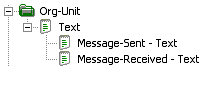
2. In each of the sub-texts, drag-and-drop the "Name" characteristic.
3. Format the text under the group, as below:

 In the properties dialog box of the component texts created, select the Format tab, then the New Line option.
This method can prove simpler than adding groups, as described in Using Groups, but it does have limitations. For example, it is not possible to specify text execution conditions as described in Text editing conditions.
Taking inheritance into account in texts with components
If the general option of variations is activated, you can choose to:
• follow default behavior of the descriptor
• or activate/deactivate inheritance
To specify behavior of text regarding inheritance:
 Select or clear the corresponding check box in the text properties.The box should remain grayed to follow descriptor default behavior.