Conditions on Links
Conditions on links can check link existence and link characteristic values.
Link existence condition: Null, Unique and Having count
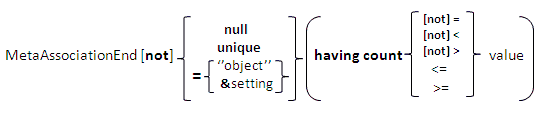
• Null means that the link does not exist. If several MetaAssociationEnds are concatenated, it is the link reached by the last MetaAssociationEnd that is tested.
For example, "select Project where Diagram.Org-Unit.Message sent null" selects projects where diagrams contain org-units that do not send messages; diagrams with no org-units are ignored.
• Unique means that the link must exist only once. For concatenated MetaAssociationEnds , the link reached by the last leg is the one counted. (Note: not unique means that at least two links exist.)
• Having count indicates the number of times the link must exist. For concatenated MetaAssociationEnds , the link reached by the first MetaAssociationEnd is the one counted.
Examples:
select Org-Unit where Diagram null
select Org-Unit into @MainOrg-Units where Component not null
select Diagram where Org-Unit.Message-Sent not null having count > 2
In this last example, diagrams containing at least two org-units that send messages are found.
Link characteristic condition
A condition on a link characteristic is expressed in the same way as a condition on an object characteristic. The name of the link characteristic is concatenated with the name of the link. This name and the characteristic name are separated by a period (.).
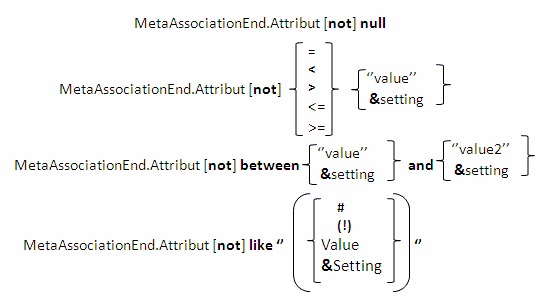
Example: Query org-units that always send at least one message:
select Org-Unit where Message-Sent.Predicate = "always"
Source object characteristic condition
You can indicate a condition for a characteristic of the source object in the same way as for link characteristics:
select Org-Unit where Message-Sent.Predicate = “always” or Message-Sent.Flow-Type = “Information Flow”
If a characteristic is not specified, the query is based on the name ("Diagram.Name ="zzz"" is equivalent to "Diagram ="zzz""):
select Diagram where Org-Unit = &Org
Browsing reflexive links Deeply
When the query target MetaClass is identical to the source MetaClass, and the link browsed is a reflexive link (eg. Composition), you can query all levels of the composition using the deeply operator.
MetaAssociationEnd deeply Condition
Examples:
select Org-Unit into @components where Aggregation-Of deeply = &Org-Unit
select [Message] where [Org-Unit-Recipient].[Message-Sent] deeply in [Message]
where [Org-UnitSender = &"Org-Unit"
The first example finds all component org-units of a given org-unit, whether directly or via intermediate org-units.
The second example queries for all Messages produced by target objects when they receive the messages sent by a given org-unit (source).
Restriction concerning Deeply
You cannot combine "Deeply" and "Inherited".
If a link is browsed with the "Deeply" keyword, the Inherited clause enabling inclusion of inherited objects is ignored for this link.
Grouped conditions
When a condition is applied to several characteristics of the source object, it is expressed as a grouped condition. Each of the "and", "or" and "not" operators involves any source object that satisfies the indicated condition. If you want the source object to be the same for different criteria, you must group these criteria with brackets.
As an example, the query:
select Org-Unit where Message-Sent.Message-Type = “External Data” and Message-Sent.Flow-Type = “Information flow”
finds the org-units that send at least one message of the “External Data” type and at least one message of the “Information flow” type. Nothing in this query indicates that the org-units found must be connected to at least one message of the “Information flow” type which is also of the “External Data” type. To do this, you must rewrite the query as follows:
select Org-Unit where Message-Sent.(Message-Type = “External Data” and Flow-Type = “Information flow”)
You must place the period before the brackets. You can also group the conditions in a sub-query:
select Org-Unit where Message-Sent in Message where (Message-Type = “External Data” and Flow-Type = “Information flow”)
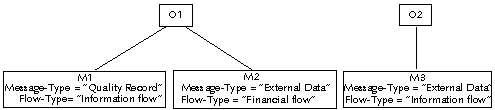
The first query gives O1 and O2, while the second only finds O2.
To combine conditions on object characteristics and link characteristics, you must also use grouped conditions.
For example, to query messages always sent by a given org-unit, that is a query on the name of an org-unit and the value of the predicate characteristic between message and org-unit, you have to write the query as follows:
select Message where Source-Org-Unit.(predicate = “always” and name = &Org-Unit)