Managing Generic MetaAssociations
A generic MetaAssociation is a MetaAssociation defined between an abstract MetaClass and another MetaClass.
All MetaClasses inheriting the abstract MetaClass inherit this "Generic" MetaAssociation by default.
You can specify that a MetaAssociation already existing between two concrete MetaClasses is in fact an alias of a generic MetaAssociation. In this case, this MetaAssociation inherits all the attributes of the generic MetaAssociation. These attributes cannot be redefined.
For example, the MetaAssociation "Source Activity" / "Sent Message" is an alias of the generic MetaAssociation "Message Source" / "Sent Message" inherited from the abstract MetaClass "Messaging Participant" by the concrete MetaClass "Functional activity".
 If you use aliases, you must remember to convert your repositories and comply with the recommendations relating to aliases. For more details, see Abstract Metamodel Extension Recommendations.
A MetaAssociation can be defined as an alias of a generic association for two reasons:
• Because the MetaAssociation existed before creation of the generic MetaAssociation representing the same link. This MetaAssociation should be kept for compatibility reasons.
• Because the MetaAssociation represents reduction of the generic MetaAssociation to a concrete MetaClass.
Managing MetaAssociation inheritance
To define that an alias on a MetaAssociation is the alias of a generic MetaAssociation:
1. Open the properties of the MetaAssociation you want to modify.
2. Select the Characteristics tab then the Advanced subtab.
3. In the Super MetaAssociation field, select the generic MetaAssociation that interests you.
4. In the Meta Specialization Type field, select:
• Depreciated if the alias is defined to assure compatibility.
• Restrictive if the alias is defined to reduce the number of MetaClasses concerned by the generic MetaAssociation.
Accessing inherited MetaAssociations
To view the list of MetaAssociations that are aliases of a generic MetaAssociation:
1. Right-click the MetaAssociation and select Explore.
2. Expand the "Restricting MetaAssociation" folder to obtain lists of restrictions of this MetaAssociation.
 Similarly, expand the folder "Restricted MetaAssociation" of a MetaAssociation from which it inherits and you obtain the generic MetaAssociation.
Viewing types in a navigation tree
A generic MetaAssociation can connect objects of different MetaClasses.
In a navigation tree, a generic MetaAssociation appears as a branch to a list of objects of heterogeneous MetaClasses.
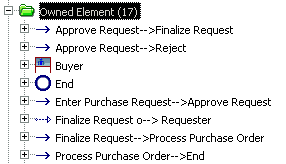
For example, if you use the explorer on an organizational process described by an organizational process diagramthe navigation tree will display an "Owned Element" branch.
If you expand this branch, you will see a list of objects of different MetaClasses.
To store these objects in the explorer as a function of their MetaClass:
1. Click View > Option.
The list of options appears.
2. Select View types.

If you expand the "Owned element" folder, you will see the sub-folders corresponding to each type.
To view icons associated with MetaClasses:
 In the same way, select View > Option > View Images.
 To view repository objects by type, in the Home navigation tree, right-click the repository name and select Regroup by Type.