Creating a Perimeter
To create a perimeter:
1. In the MetaStudio navigation window (View > Navigation Windows > MetaStudio), expand the Perimeters folder.
2. Expand the Perimeters folder.
3. Right-click the Custom Perimeters folder and select New > _Operator.
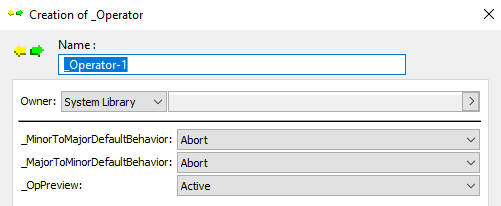
4. Enter a Name for the perimeter.
5. Define characteristics of the perimeter:
 For information on how to configure propagation, see Introduction to Perimeters
• _MinorToMajorDefaultBehavior represents the default behavior of links of major objects to minor objects.
The default value "Abort" (links not propagated) avoids generating large volumes of objects.• _MinorToMajorDefaultBehavior represents the default behavior of links of minor objects to major objects.
The default value "Abort" (links not propagated) avoids generating large volumes of objects.• _OpPreview enables display of the perimeter in configuration of the MetaTool (see Viewing MetaAssociation Behavior Related to a Perimeter).
Default value "Active"6. Click Finish.
The new perimeter appears in the list of Customized Perimeters.
To use this perimeter with a MetaTool, see Using a Perimeter in a MetaTool then Modifying the MetaTool Default Perimeter.