Assessment Deployment Collection
The objects of the Assessment Deployment Collection define assessment scope which is the list of objects to be assessed, the context list where the objects will be assessed or the respondents who will evaluate the objects.
1. Assessment Deployment Collection type
There are four types of Assessment Deployment Collection:
- Objects to assess: The collection defines objects to be assessed.
- Context objects: The collection defines context objects where the assessed objects will be assessed.
- Respondents: The collection defines the users who will be asked to evaluate the assessed objects.
2. Assessment Deployment Collection filling modes
There are four modes to fill the Assessment Deployment Collection:
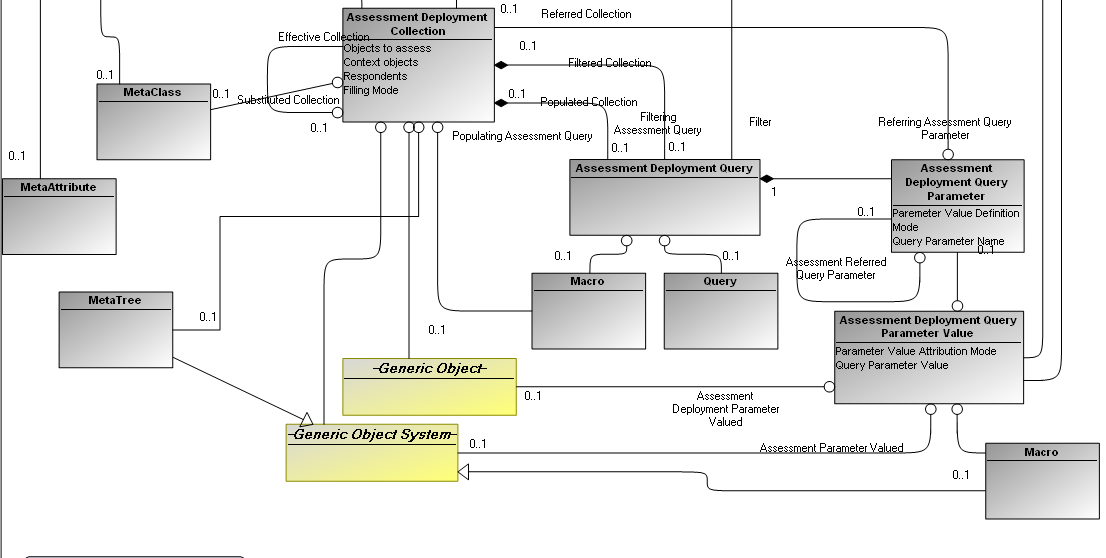
- Object List: This mode allows connecting objects directly from the repository. This can be done via the two links Generic Object and Generic Object System.
- Query: The Query mode allows using an HOPEX query to fill the collection. If the HOPEX query has parameters, it is necessary to create parameters in the deployment query and to map them to the HOPEX query parameters. Thus, each parameter deployment can specify how the value will be specified.
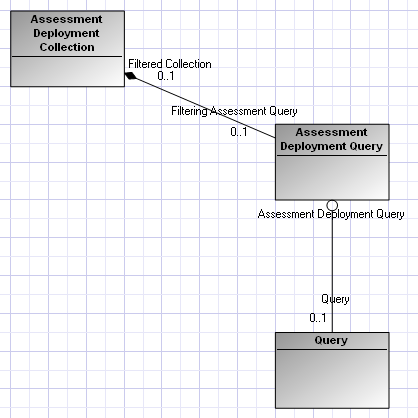
- Macro: The filling mode by macro allows calling a specific macro to find objects of Deployment Collection.
The macro must define a method named ‘assessmentCollectionFill' with this signature:
Sub assessmentCollectionFill(mgobjAssessmentCollection As MegaObject,mgcolCollection As MegaCollection,)
End Sub
Arguments:
mgobjAssessmentCollection : the current Collection
mgcolCollection : The MegaCollection to return the result of the collection
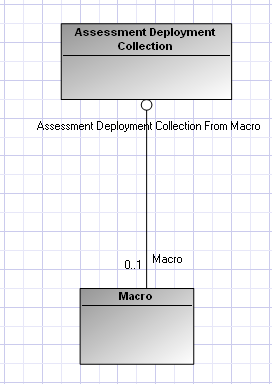
- Macro with parameters: The filling mode by macro allows calling a specific macro to find objects of Deployment Collection.
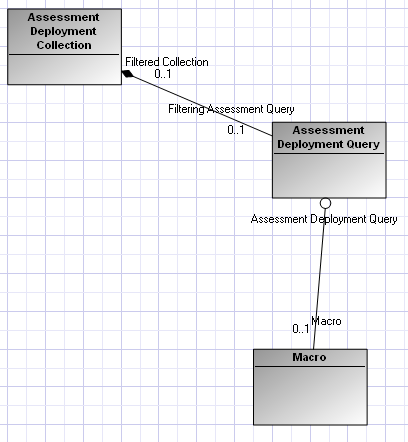
The collection can have parameters; in this case, it must have an Assessment Deployment Query to specify the parameters.
The macro must define a method named ‘assessmentCollectionFill' with this signature:
Sub assessmentCollectionFill(mgobjAssessmentCollection As MegaObject,mgcolCollection As MegaCollection,strTreePath As String,strParameters As String)
End Sub
The Sub plays the same role as queries: filling the Assessment Deployment Collection in the context of Deployment. Sometimes the search of objects is too complicated to do with a Select Query and Macro Queries support only one parameter; in that case parameters must be passed to the String ‘strParameters'. Also sometimes the need is to generate a String path instead of a collection of objects: in this case, the parameter to fill is ‘strTreePath'.
Arguments:
mgobjAssessmentCollection : the current Collection
mgcolCollection : The MegaCollection to return the result of the collection
strParameters: Contains the values of the collection parameters, format: parameter1MatchingName.value1,parameter1MatchingName.value2… parameterNMatchingName,valueN
strTreePath: A String containing the objects result. The format of this string is
Object1ID:Object1MetaClass, Object2ID:Object2MetaClass…
- By Tree: This filling mode allows displaying a specific MetaTree and selecting one or more objects to fill the Deployment Collection.
3- Assessment Deployment Query Parameter(ADQP)
An Assessment Deployment Query, which uses a HOPEX query with parameters, must create an ADQP for each of the HOPEX query parameters used. The ADQP corresponding to the query parameter indicates how to find the value so that the HOPEX query can be executed.
There are three types of ADQP:
- Direct Value: the ADQP is associated with an Assessment Deployment Query Parameter Value which defines directly an object via the link Generic Object or Generic Object System.
- From Deployment Collection: The ADQP refers another collection; its value will be the current value of the referenced collection in the context of a Deployment.
- Refers Parameter: The ADQP refers another ADQP; its value will be the current value of the referenced ADQP in the context of a Deployment.
- Direct Evaluation: the ADQP is associated with an Assessment Deployment Query Parameter Value which defines directly an object via the link Generic Object or Generic Object System. This ADQP is not displayed in th GUI; its value is assigned by code.
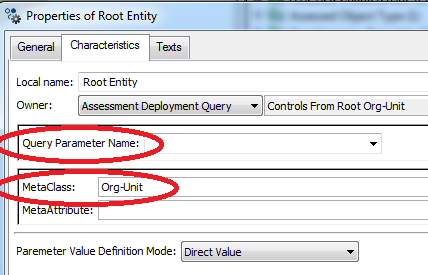
There are two ways to match the ADQP with the HOPEX query Parameter:
- Query Parameter Name: This attribute contains the name of HOPEX query Parameter to match. This way is dangerous; any change in the names of the parameters of HOPEX query can cause the loss of the match.
- MetaClass: If the HOPEX query parameters of a HOPEX query are of different types, using the MetaClass is more efficient than using Query Parameter Name. The match of the parameters will be based on the comparison of the MetaClass of the ADQP and the MetaClass of HOPEX query Parameter.
If the HOPEX query contains one parameter, no matching is necessary; the first ADQP found is taken.