Optimizing Visio Import Results
Import results mainly depend on the source file. For optimum results, check that the Visio drawing meets the following conditions:
• Use model shapes to represent diagram objects
For example, use the Business Process type shape and not the Rectangle drawing object.
• Customized shapes and properties are ignored at import. Do not use customized properties to name drawing objects.
Object Names and Properties
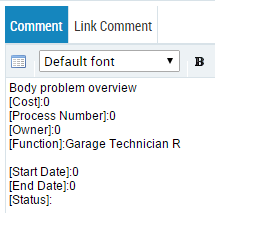
Object names are limited to 255 characters in HOPEX. If the Visio object name contains more than 255 characters, the full name appears in the HOPEX object comment, under the Texts Tab.
The HOPEX object comment also contains the properties specified on the Visio shape. Shape properties are listed in brackets.
 Properties specific to the corresponding HOPEX Objects may be defined directly in the import wizard. See Step 3: Define the mapping of objects of each Visio page.