IDEF1X Data Area Diagram
HOPEX DoDAF enables you to create a diagram supporting the same modeling as in the Data Area Entity diagram but with the IDEF1X notation.
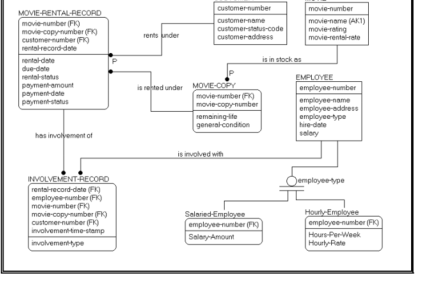
Creating an IDEF1X data area diagram
To create this type of diagram:
1. In the navigation menu, click Data and Information Viewpoint > DIV-2 Logical Data Model > Data Areas.
2. Right-click a data area and select IDEF Data Area Diagram.
The diagram can be described with the following object types:
Entity
 An entity represents any person, place, thing, event or concept about which information is kept.
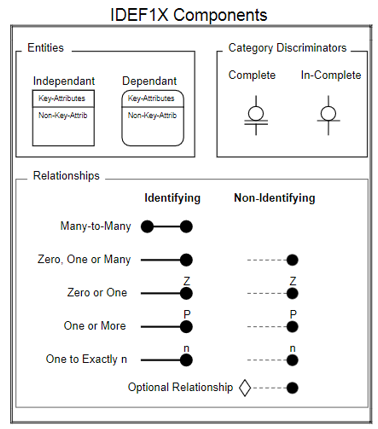
The IDEF1X notation displays entities as rectangles with squared or rounded corners:
• square corners by default for independent identities
An independent entity does not depend upon any other entity in a model for its identification.• rounded corners for dependent entities
A dependent entity depend for its existence an its identification upon another entity in the model.Relationship
Relationships represent associations between entities.Relationships are shown as lines between the entities:
• Solid lines for identifying relationships
 In the case of an identifying relationship, the keys from the parent form part of the key for the child entity.
• Dashed lines for non-identifying relationships
In the case of a non-identifying relationship, the keys of the parent entity become foreign keys in the child entity.Summary of IDEF1X Notation