Adding an ArchiMate Relationship
 |
 |
 The association relationship is available by default for all new concepts. So, creating specific relationships is not systematically needed.
To create a new relationship:
1. Create a new MetaClass and define it as a subtype of ArchiMate Concept Relationship at the appropriate subtype level.
Only MetaClasses subtypes of Model Building Block.2. If necessary, define a GUIName according to the relationship types.
3. Add GenericLocalName as a substitute for Name.
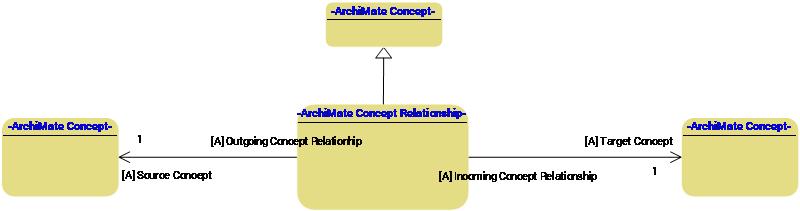
4. Create two new MetaAssociations pointing to the source / target concepts.
5. Define this MetaAssociations as subtype of the Source / Target MetaAssociations.
6. Add a MetaPicture with an icon of the desired type.
7. Connect the MetaClass to the "ArchiMate - ArchiMate Element Characteristics" PropertyPagePresentation.
8. Update the ArchiMate diagram setup using predefined macros. For more details, see Updating the ArchiMate diagram type setup.