Scheduling a Synchronization
To schedule the synchronization:
1. From the Synchronize menu, click Scheduling.
The Setup scheduling of Synchronization page appears.
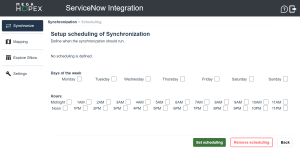
2. Select the day(s) of the week and the hour(s) to run the synchronization.
 Do not set up synchronizations more than every 6 hours. Both ServiceNow and HOPEX could get overloaded, hence less efficient.
3. Click Set scheduling.
 The scheduled synchronization can only start if the server hosting HOPEX is running. If not, it will be postponed until the server is available again.