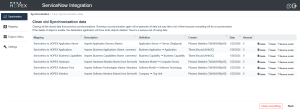
Cleaning Previous Synchronization Data
To clean previous synchronization data:
1. From the Synchronize menu, click Clear.
2. Select a cleaning option for the relevant mapping.
• Remove invalid is the safest option to clean the database. It removes any mapping data referencing an object that no longer exists.
• Reset is advised when you have added or modified fields in a mapping and you want to bring new data. Objects will be resynchronized at the next synchronization, even if they have not been modified.
• Delete is to be used carefully. It removes all correspondences between HOPEX and ServiceNow. It is advised if you need to initialize a new mapping (e.g. if you have changed the source or the target object of a mapping).
 Clean Everything is to be used carefully: it removes all correspondences between HOPEX and ServiceNow for all the mappings (e.g. you need to restart from zero using a different database).