Modifying the Supervision File Location
To modify the supervision file location:
1. Create the directory where you want the supervision files to be stored.
Example: c:\log
2. From HOPEX Server Supervisor, select Hopex Supervision > Supervision configuration.
3. Select the Supervision tab.
4. In the Supervision Log folder field, use the browse button  to define the directory path where the supervision files are stored.
to define the directory path where the supervision files are stored.Example: c:\log
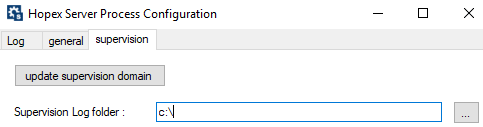
These modifications are immediately taken into account. Supervision files are stored in the specified directory (e.g.: c:\log).