Cleaning up a Repository
During modeling work, handling different objects results in creation of temporary objects (temporary queries, etc.). It is probable that these objects will subsequently be unnecessary. To avoid unnecessarily increasing repository size, you can delete these temporary objects.
To clean up a repository:
1. Connect to HOPEX Administration and select the repository concerned.
2. Right-click the repository concerned and select Object Management > Repository cleanup.
 Alternatively, connect to HOPEX and in the menu bar, select File > Properties. In the properties of the repository to which you are connected, select Characteristics.
The Repository Cleanup dialog box opens.
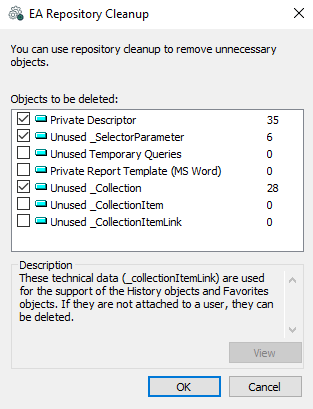
3. (Optional) To view the content of an object group, click the object group name and then click View.
4. Select the object groups to be deleted and click OK.
By default, all the object groups that include objects are selected.Selected object groups are deleted from the repository.