Locking Validated Objects
When objects have been validated, you can configure the writing access diagram so that these objects cannot be modified.
To lock objects:
1. From HOPEX Administration, open the writing access diagram.

2. Between the writing access area "Project Management" and that of the project, insert a writing access area dedicated to validated data of the project.
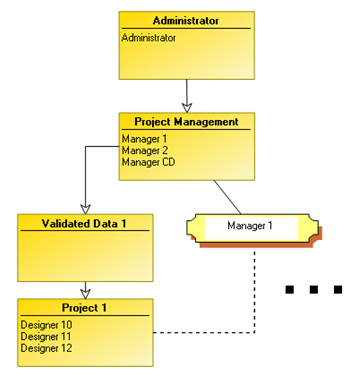
3. When data is validated, modify its writing access area from "Project" level to the higher level "Validated Data" writing access area.
4. (Optional) If validated data must be modified:
• it is modified by a user of "Project Management" writing access area level.
• it is lowered to the "Project" writing access area level.
So the project perimeter is distributed between two writing access areas, but remains perfectly determined.