Reading Access Diagram Operating
The reading access diagram implements reading access areas of General  type. These areas can group both objects and persons and/or person groups.
type. These areas can group both objects and persons and/or person groups.Reading access areas are organized hierarchically. MEGA provides two extreme reading access areas:
• Maximum Reading Access, the highest reading access level.
• Standard, the lowest reading access level.
Each object belongs to a reading access area (Standard by default).
Each person or person group is connected to one of the reading access areas. The persons or person groups that are connected to:
• Maximum reading access sees all repository data.
• A created reading access area sees all data of this area, as well as that of lower level reading access areas.
• Standard sees only non-confidential data of the repository.
For example, a user U1 connected to a reading access area C1 sees all objects that belong to:
• his/her reading access area (C1)
• lower level reading access areas (C2 and Standard).
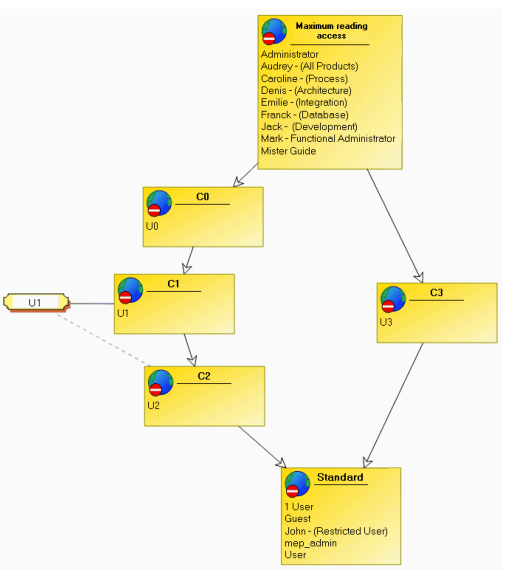
In the preceding reading access diagram, user U1:
• is connected to reading access area C1
• to a reading access area at creation C2.
When user U1 creates an occurrence of a MetaClass:
• if sensitive (high sensitivity), this belongs to reading access area C1.
• if non-sensitive (standard sensitivity), this belongs to reading access area C2.
 For more details on MetaClass sensitivity, see Managing MetaClass Sensitivity and Reading Access Areas.
If a user does not have a reading access at creation, any occurrences of a non-sensitive MetaClass he/she creates belong to the standard reading access area.
However, Web sites, reports, reports (MS Word) Report DataSets are always created at the reading access level of the user. This ensures confidentiality of the information they may contain.
Users connected to reading access area C3 cannot see objects belonging to reading access areas C0, C1, and C2, since area C3 does not belong to the same hierarchical branch as areas C0, C1, and C2.