The NSV-4 Report Template
The NSV-4 report template synthesizes information about the system functions and the data flowing between them.
The first parameter indicates the architecture to be analyzed.
The second parameter, called a System Process Subset, is optional. This is used to reduce the scope of the study to a subset of the system processes defined in the architecture. If this parameter is not set, all the system processes defined in the architecture are taken into account.
The NSV-4 System Function Composition Hierarchy Chapter
This chapter expands the hierarchy of system functions. It details the hierarchical structure of the system processes and their assigned tasks. The performance of system functions can be delegated to other system processes. This results in a system functions tree where system functions are indirectly connected by sub-system processes.
The chapter starts from (explicitly or implicitly) selected system processes. For each system process a tree structure of the system function is displayed with its name and comment. The tasks and performing system processes are also included in the tree.
The NSV-4 System Function Specialization Hierarchy Chapter
The NSV-4 system function specialization hierarchy chapter shows how the system processes of the architecture are specialized.
The system processes are presented in a table along with their comments and the library to which they belong. If a variant of a system process is created, the varied system process is presented in the table along with its variant.
To create new specializations (variants), use the New > Variant command on the system process to be varied (specialized).
The NSV-4 System Function Generalization Hierarchy Chapter
The NSV-4 system function generalization hierarchy chapter shows how the system processes of the architecture are generalized.
The system processes are presented in table form along with their comments and the library to which they belong. If a variant of a system process exists, this variant is also presented in the table along with the varied system process (system process from which the variant was created).
To add a new generalization, use the Connect > Variant Of command of the specialized item (variant).
The NSV-4 System Function Dictionary Chapter
This chapter lists the flows of data exchanged by the system function.
A list of the system processes retrieved during the analysis is presented.
If all the system processes of the architecture are retrieved (no value for the sub-system process parameter), the system process diagrams of the root system process are displayed in the chapter.
A paragraph dedicated to each of the selected or retrieved system processes is displayed in the chapter. This paragraph includes:
• The system process with its name and comment
• The system process diagrams which describe the system process
• The list of tasks organized by the system process with the name and comment of each task
• The list of all the tasks retrieved in the architecture
The NSV-4 System Function Exchange Chapter
The NSV-4 System Function Exchange chapter lists the interactions that are set between the tasks of system processes. It shows the diagrams that display information exchanges between system processes and system functions. It also details the information exchange between the selected tasks. All messages or interactions connecting tasks are displayed in a list with their name, comment and source and target and the information element that is exchanged.
The NSV-4 System Function Exchange Balance Chapter
This chapter helps to define the compliance of the exchanges defined within system processes and the exchanges received and /or sent by these system processes. The chapter lists all the exchanges modeled within and outside each system process between the contained and detailing tasks.
All incoming and outgoing exchanges defined inside and outside of the system process are compared. This comparison enables the user to determine missing as well as unnecessary information for the exchange design.
Different icons with arrows are used to give valid information relating to each message and interaction. These arrows aid in the comparison making process.
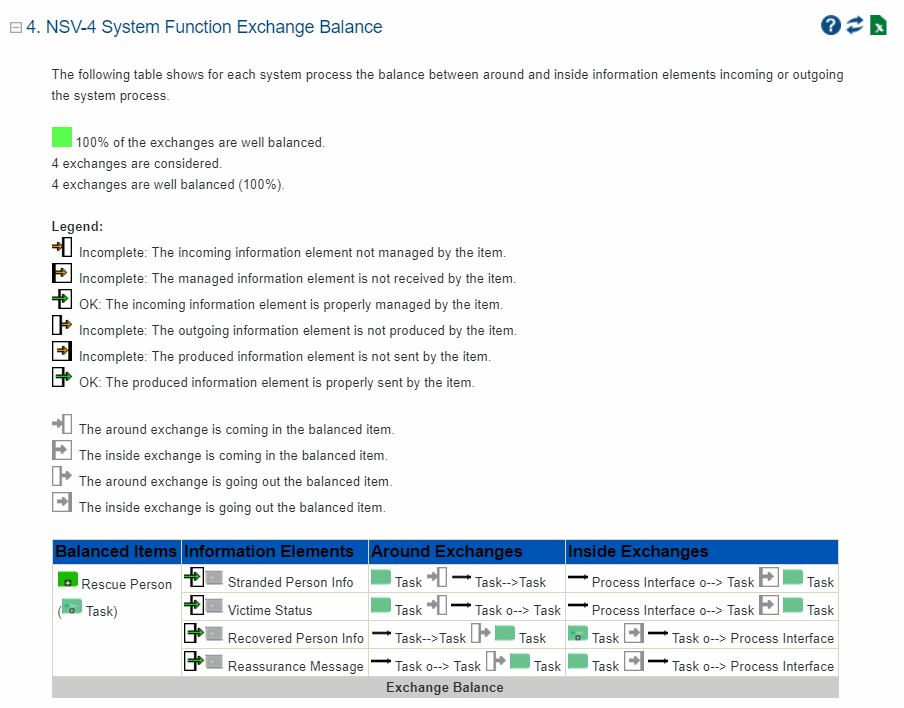
Example of an NSV-4 System Function Exchange Balance Chapter
In the above example, two of the exchanges were not well balanced. Upon investigation it was revealed that they were not accounted for in any of the system capability configurations defined in NCV-3.