Creating Operational Node Structure Diagrams
After creating your operational nodes the need for information exchange between operational nodes can be illustrated in the Operational Node Structure Diagram. This information exchange is represented by interactions created between the nodes. The diagram shows how operational nodes and interactions interact with each other.
An Operational Node Structure Diagram details the structure of an operational node. The node is composed of sub-nodes that are connected to each other through interactions.
Below is an example of an operational node structure diagram. The operational nodes are represented by yellow rectangles.
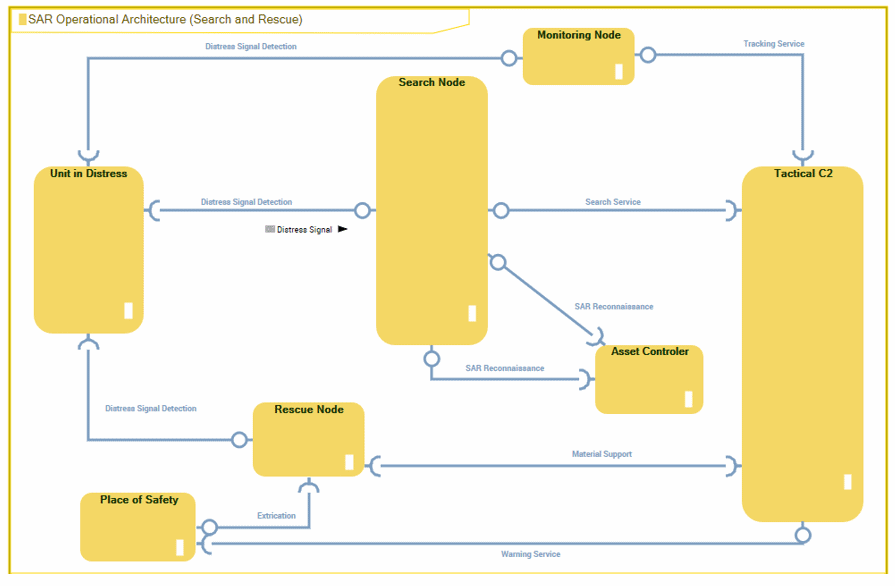
Example of an Operational Node Structure Diagram (no content displayed)
The described node establishes a context for the interactions. For this reason sub-nodes are not directly connected in the diagram.
As sub-nodes can be reused in other contexts the interactions link the intermediate objects that reference the sub-nodes and that are defined locally within the context of the node. This way you can differentiate the interactions performed in one node context from those performed in another node context. In the case of operational nodes, the intermediate objects are called Operational Components. If no name is set for an operational component, a name is automatically created from the referenced operational node.
To create an operational node structure diagram:
1. In the NAF navigation tree click Operational Views > NOV-2.
2. Right-click the operational node concerned and select New > Operational Node Structure Diagram.
The new diagram opens with a Root Operational Node positioned in it.
Adding operational nodes to the diagram
Operational nodes in the Structure diagram are referred to as operational components.
To add an operational component to the diagram:
1. Click the Operational Component icon  in the object bar and click in the diagram.
in the object bar and click in the diagram.2. In the Add Operational node dialog box that appears, select the operational node concerned from the drop-down list.
 The name of the operational component is the name of the operational node that is used for the component.
3. Repeat this step to create as many operational nodes as necessary.
Adding interactions to operational nodes
After creating your operational nodes you can display the interactions between them. Interactions describe the information that can be exchanged between two nodes.
 An Interaction represents a contract between entities in a specific context inside or outside a company. These entities can be organizations, activities, or processes. The content of this contract is described in a protocol.All the structure diagrams (operational node, resource architecture or artifact assembly in NSV-1) are based on the same interaction principle. For more information, see NSV-1 System Interface Description.
To add an interaction to operational nodes:
1. In the objects toolbar for a diagram, click Interaction 
2. Click the entity requesting the service and draw a link to the entity providing the service.
3. In the add interaction dialog box, specify the exchange contract you wish to use.
4. Click Add.
Adding content to interactions
It is possible to add and display the content of interactions in the different structure diagrams.
Content of an interaction is described by an exchange contract.
An exchange contract is a model of a contract between organizational entities. This contract is described by exchanges between an initiator role and one or several contributor roles.In a service-oriented architecture, communication is based on service points and request points.
A service point is a point of exchange by which an agent offers a service to potential customers.A request point is a point of exchange by which an agent requests a service from potential suppliers.For more details, see Adding Service and Request Points to Operational Nodes.