Managing Workflow Object Statuses
In HOPEX, the status of an object can be specified in two ways:
• with a generic attribute
• with a specific attribute
Managing object status with the generic attribute
The workflow engine supplies the generic attribute "Current Workflow Status".
It appears in the Characteristics tab of the properties dialog box of the workflow subject (or system workflow subject).
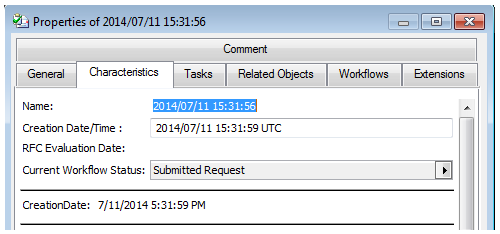
 This attribute is a calculated attribute of identifier type. It contains the identifier of a workflow status.
Several workflow definitions can be associated with an object. Among these workflow definitions however, only one can supply the object status.
To specify the workflow definition to be taken into account for object status calculation:
1. See Accessing workflow definitions.
2. Open the properties dialog box of the workflow definition.
3. In the Main Workflow field, select value "Yes".
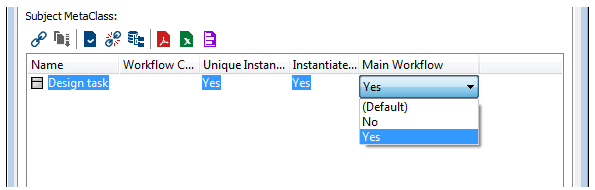
 Several workflow definitions can be defined for the same MetaClass. However, a MetaClass can only have one main workflow definition.This is the link between the workflow definition and the subject MetaClass.
Managing object status with a specific attribute
In certain cases, it can be useful not to use a generic attribute defined at workflow engine level to manage object state. This can be the case when certain workflow statuses are considered too technical and the end user does not wish them to be visible. Here it consists of displaying a workflow state independent of workflow status.
HOPEX enables establishment of mapping between a specific attribute and the workflow status.
The generic macro Updating Attribute for Subject enables execution of an attribute update according to the current workflow status.
To carry out this configuration, you must:
• define an action.
• associate this action with the generic macro "Updating Attribute for Subject".
• establish mapping between the attribute and the workflow statuses.
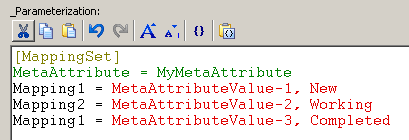
This configuration is carried out in the "_Parameterization" text.
• connect the action to each transition on which you want to update the attribute.
To establish mapping between the specific attribute and the workflow statuses:
1. See Accessing workflow definitions.
2. In the action properties dialog box, select the Characteristics tab.
3. In the _Parameterization frame, insert a section [MappingSet].
4. Indicate the identifier of the specific attribute you previously created.
<MappingAttribute>=<AttributId>
5. Create the link between:
• a MetaAttributeValue of the attribute
• a workflow status
<Mapping%i%>=<MetaAttributeValueId>,<WorkflowStatutId>