Using a Perimeter in a MetaTool
To use a perimeter in a MetaTool, you must connect this perimeter to the MetaTool concerned.
 You can connect a perimeter to several MetaTools, enabling reuse of the same perimeter in different contexts.
To connect a perimeter to a MetaTool:
1. In the MetaStudio navigation window, expand the Perimeters folder.
3. Expand the perimeter concerned.
4. Right-click the Tools folder and select Connect > MetaTool.
5. Using the Query tool, select the MetaTool concerned.
You can select several MetaTools.The MetaTool is added to the Tools folder.
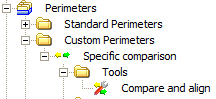
In the following example, the "Compare and Align" MetaTool is connected to the "Specific comparison" perimeter