Modifying the MetaAssociation Behavior Related to a Perimeter
You can modify MetaAssociation behavior related to a perimeter.
To modify MetaAssociation behavior related to a perimeter:
1. Open the Configuration of Behavior of MetaAssociations Related to Perimeter dialog box, see Viewing MetaAssociation Behavior Related to a Perimeter.
2. Right-click the MetaAssociationEnd.
3. In the Behavior section, select Propagate, then the propagation behavior.
• The icon on the left, representing the behavior of the perimeter on the MetaAssociation, is updated according to the selected propagation behavior.
• The  icon indicates that propagation of the MetaAssociationEnd is different from propagation of the MetaAssociationType.
icon indicates that propagation of the MetaAssociationEnd is different from propagation of the MetaAssociationType.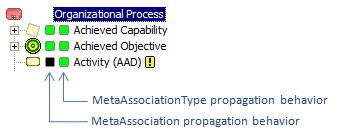
The new behavior is active from next use, except for "Computed" behavior, which required additional configuration.
 "Computed" behavior uses a macro (_BehaviorMacro which must be previously created and linked to the current link and perimeter, see Creating a macro to calculate a MetaAttribute.