Creating a perimeter
To create a perimeter:
1. From HOPEX, display the MetaStudio navigation window (View > Navigation Windows > MetaStudio).
Note: you must be in "Expert" metamodel access.
2. Expand the Perimeters folder.
3. Right-click the Custom Perimeters folder and select New > _Operator.
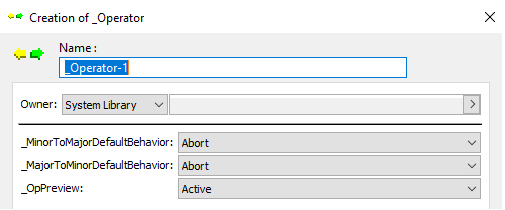
4. Enter a Name for your perimeter.
The following properties are already specified:
• _MajorToMinorDefaultBehavior
This is the default behavior to give to links in direction Major Object to Minor Object. This property is set to "Abort". The strategy is to not propagate links so as to avoid a high-volume object set. You then specify behavior on the links you want to browse.
• _MinorToMajorDefaultBehavior
This is the default behavior to give to links in direction Minor Object to Major Object. This property is also set to "Abort".
• _OpPreview: (Active\Inactive)
This property enables activation of perimeter display in the configuration MetaTool, see Configuring a perimeter.
5. Click Finish.