Adding Fields to Nodes/Arcs
A node can carry fields, which are:
• based on values:
• MetaAttributes
• TaggedValues
• Legattributes
• computed with a macro
• an object
These fields are displayed on the node, but can be hidden.
Field access
By default, the field is provided by the source object (Access section: "Direct").
You may want to provide the field by a MetaAssociationEnd of the source object (Access section: "MetaAssociationEnd").
Adding value-based fields to a node
To add a value-based field to a node:
1. Access the GraphSet Definition properties.
2. Display its Definition page.
3. In the GraphSubSet drop-down list, select the GraphSubSet concerned.
 Else directly access the GraphSubSet properties, see Displaying the GraphSubSet properties.
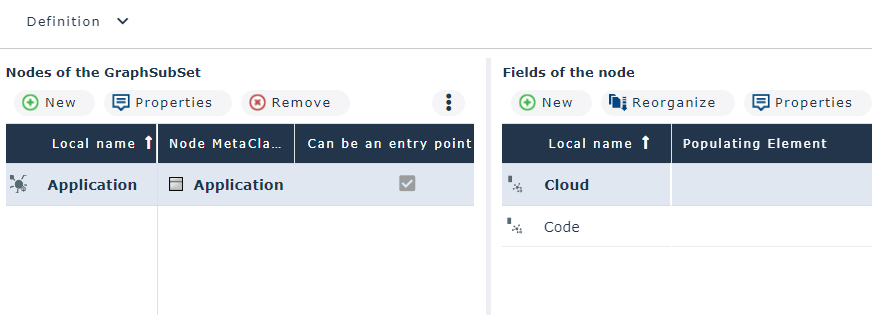
4. In the Nodes of the GraphSubSet pane, select the row of the node for which you want to define a field.
E.g.: Application.
5. In the Fields of the node pane, click New  .
.
.The Creation of GraphSet Field Definition windows is displayed.
6. In the Local name field, modify the default name.
7. (For a field from a MetaAssociationEnd) In the Access section:
• in Access type: select "MetaAssociationEnd"
• in MetaAssociationEnd: select the MetaAssociationEnd concerned
8. In the Configuration section, define the value type:
By default the value is based on a MetaAttribute.
If your value is TaggedValue-based, select taggedValue.
9. Depending on the value type:
• in the MetaAttribute drop-down list, select the MetaAttribute you want to be displayed in the field.
• in the TaggedValue field, click the right oriented arrow and connect the TaggedValue you want to be displayed in the field.
10. Click OK.
Adding macro-based fields to a node
Prerequisite:
For each macro-based field you have to create its implementing macro. This macro is based on the GetAttributeValue function:
GetAttributeValue(Object as MegaOject,AttributeID as Variant,Value As String)
Where:
Object is the object of which the attribute value is requested.
AttributeID is the absolute identifier of the attribute.
Value is the attribute value returned by the function, concerning this object.
See examples of macro-based field on intermediate nodes: To add a macro-based field to a node:
1. Access the GraphSet Definition properties.
2. Display its Definition page.
3. In the GraphSubSet drop-down list, select the GraphSubSet concerned.
Else directly access the GraphSubSet properties, see Displaying the GraphSubSet properties.4. In the Nodes of the GraphSubSet pane, select the row of the node for which you want to define a field.
5. In the Fields of the node pane, click New .
.The Creation of GraphSet Field Definition windows is displayed.
6. In the Local name field, modify the default name.
7. (For a field from a MetaAssociationEnd) In the Access section:
• in Access type: select "MetaAssociationEnd"
• in MetaAssociationEnd: select the MetaAssociationEnd concerned
8. In the Configuration section:
• In Property type field: select "Computed"
• In the Implementation field, click the right-oriented arrow and connect the macro that enables to compute the field value.
Define the MetaAttribute characteristics:
• Length
• Type (default value "String)
• Format (default value "Standard)
9. Click OK.
Adding object-based fields to a node
In case of "MetaAssociationEnd" Access type, you might want to add the object itself.
To add an object-based field to a node:
1. Access the GraphSet Definition properties.
2. Display its Definition page.
3. In the GraphSubSet drop-down list, select the GraphSubSet concerned.
Else directly access the GraphSubSet properties, see Displaying the GraphSubSet properties.4. In the Nodes of the GraphSubSet pane, select the row of the node for which you want to define a field.
5. In the Fields of the node pane, click New .
.The Creation of GraphSet Field Definition windows is displayed.
6. In the Local name field, modify the default name.
7. In the Access section:
• in Access type: select "MetaAssociationEnd"
• in MetaAssociationEnd: select the MetaAssociationEnd concerned
8. In the Configuration section:
• in Object property type: select "Object"