Logical to Physical Synchronization: the Associations
Synchronization of associations is available with the former UML formalism which takes into account associations but not parts. See Logical Data Modeling Options.
Constraint associations (multiplicities: 0,1 or 1,1)
A constraint association is a binary association one role of which has maximum multiplicity 1 In this case, it is not necessary to create a table corresponding to the association. Simply add a column to the table that corresponds to the entity.
A constraint association (one of its maximum multiplicities is 1) does not result in a table. In the following example, an order has only one customer.
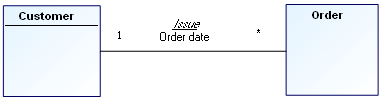
Synchronization of this data diagram produces one of the two following results:
The association does not result in a table.
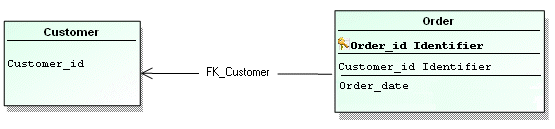
• A column corresponding to the key for the “Customer” entity is created in the “Order” table.
• A column is also created for each attribute of the association.
• A foreign key “FK_Customer” is added to check the “Customer_ID” column in the “Order” table. It indicates that the possible values for the “Customer_ID” column in the “Order” table are the values that already exist in the “Customer ID” column of the “Customer” table.
The foreign key is created from the entity identifier.
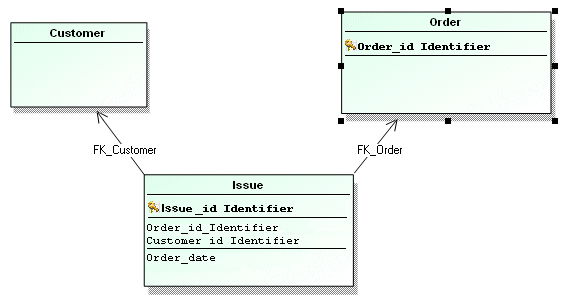
The association is transformed to a table
For the association to be transformed into a table:
1. Open the properties dialog box of the association.
2. Click the Characteristics tab.
3. In the Potential Mapping field, select "Table".
Constraint associations (multiplicities: 0,1 and 0,1)
In this particular case, the combination of multiplicities is ambiguous. There is nothing that can be used to decide which table should contain the column corresponding to the attribute.
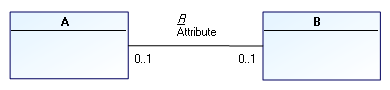
Synchronization proposes a column in each table.
Deadlocks
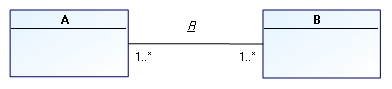
The multiplicities 1..X, 1..X indicate that each of the two objects must be connected to at least one object of the other type in order for it to exist.
This poses problems when creating the first object of each type. In fact:
• An object of type A must exist in order to create an object of type B and then connect them.
• Conversely, an object of type B must exist in order to create an object of type A and then connect them.
This is the case for the following multiplicity combinations:
• Multiplicities of 1..*, 1..*
• Multiplicities of 1, 1..*
However, it is not physically impossible to resolve such cases, because the problem is limited to creating the first object of each type. In addition, no foreign key is generated for verifying data integrity in the first case, and only one in the second case, so there is no resulting deadlock situation.
Multiplicities 1, 1 generate several obligatory foreign keys that will become deadlocked:
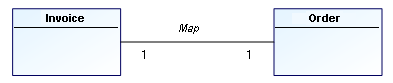
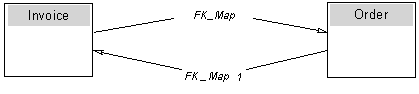
This situation results in complete deadlock, because in order to meet the constraints, several tables must be created at the same time.
Certain DBMSs prohibit creation of tables of this type.
For correct synchronization, situations such as this should be avoided.
 Select one of the foreign keys and assign it a multiplicity of 1, then assign 0..1 to the other. You can also pull the foreign key from the table after synchronization , but this is less convenient.
You can still impose the minimum multiplicity of 1 by adding a constraint as shown below. This constraint will not be taken into account in the synchronization.
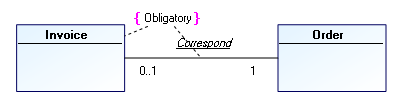
Here is another example using a reflexive link: Reflexive link 1, 1 or 0..1, 1
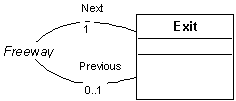
We want to show that each exit from a freeway comes before an exit and comes after an exit.
When modeled this way, all exits must be created at the same time, because each exit must have a previous exit already created.
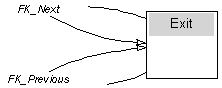
To avoid this, set the multiplicities to 0..1 and 0..1.
Non-constraint association
An association where maximum multiplicities are not 1 will have a corresponding table:
• A column is created for each attribute of connected entities identifiers.
• The primary key for the table uses all these columns.
• A foreign key is also built for each connected entity.
• An additional column is created for each attribute of the association.
Before starting synchronization it is advisable to check validity of the data diagram and check that synchronization configuration is correct. See Preparing Synchronization.
Association class
Associations connecting associative classes are not included in synchronization.