Generalizations
What is a generalization?
 A generalization represents an inheritance relationship between a general entity and a more specific entity. The specific entity is fully consistent with the general entity and inherits its characteristics and behavior. It can however include additional attributes or associations. Any object of the specific entity is also a component of the general entity.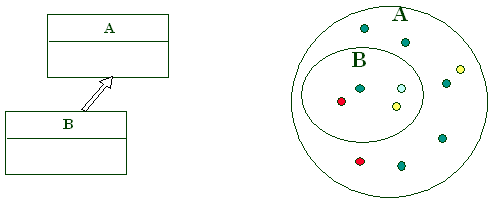
Entity A is a generalization of entity B. This implies that all objects in entity B are also objects in entity A. In other words, B is a subset of A. B is then the sub-entity, and A the super-entity.
Example:
A: Person, B: Bostonian.
B being a subset of A, the instances of entity B "inherit" the characteristics of those in entity A.
It is therefore unnecessary to redescribe for entity B:
• Its attributes
• Its associations
Example:
The “Large Client” entity, representing clients with a 12-month revenue exceeding $1 million, can be a specialization of the Client entity (origin).
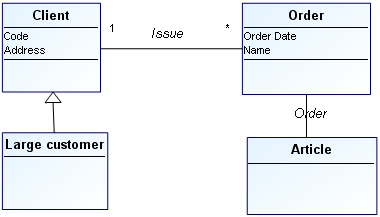
In the above example, the associations and attributes specified for “Client” are also valid for “Large client”.
Other examples of generalizations:
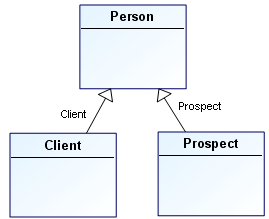
"prospect" and "client" are two sub-entities of "person".
"export order" is a sub-entity of the "order" entity.
"Individual person" and "corporate person" are two sub-entities of the "person" entity.
"polygon", "ellipse" and "circle" are sub-entities of the "shape" entity.
"oak", "elm" and "birch" are sub-entities of the "tree" entity.
"motor vehicle", "off-road vehicle" and "amphibious vehicle" are sub-entities of the "vehicle" entity.
"truck" is a sub-entity of the "motor vehicle" entity.
Multiple sub-entities
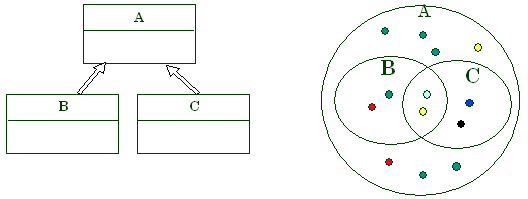
Several sub-entities of the same entity:
• are not necessarily exclusive.
• do not necessarily partition the set.
Advantages of sub-entities
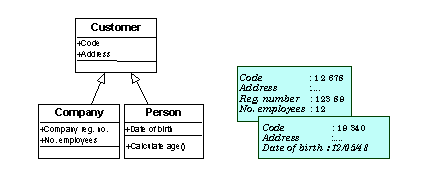
A sub-entity inherits all the attributes and associations of its super-entity, but can have attributes or associations that the super-entity does not have.
A sub-entity can also have specific attributes. These only have meaning for that particular sub-entity. In the above example:
• "Registry number" and "number of employees" only have meaning for a "company".
• "Date of birth" is a characteristic of a "person", not a "company".
A sub-entity can also have specific associations.
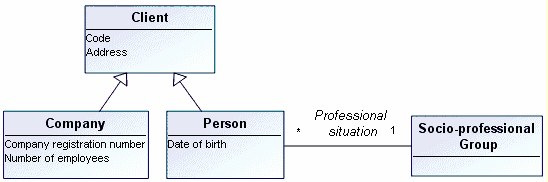
• A "person" falls into a "socio-professional group": “manager”, “employee”, “shopkeeper”, “grower”, etc. This classification makes no sense for a “company”. There is also a classification for companies, but this differs from the one for persons.
Multiple inheritance
It is sometimes useful to specify that an entity has several super-entities. The sub-entity inherits all the characteristics of both super-entities. This possibility should be used carefully.
Creating a generalization
To create a generalization:
1. In the data diagram insert toolbar, click the Generalization button. 
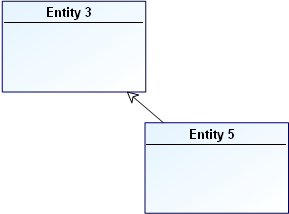
2. Click the sub-entity, in this example "Entity 5", and drag the mouse to the general entity, in this example "Entity 3", then release the button.
The generalization is now indicated in the diagram by an arrow.
Discriminator
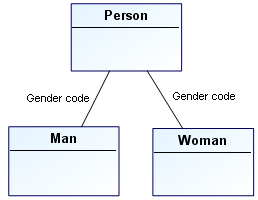
The discriminator is the general entity attribute whose value partitions the objects into the sub-entities associated with the generalization.
For example, the gender code attribute divides the objects in the person entity into the man and woman sub-entities.
To create a discriminator on a generalization:
1. Open properties of the generalization.
2. Click the drop-down list then Characteristics.
3. In the Discriminator field, click the arrow and select Connect Attribute (DM).
4. Find ans select the discriminator among the super-entity attributes.
Once selected, the discriminator is displayed on the generalization.
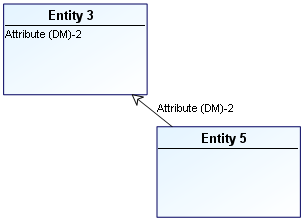
 You can also indicate if the generalization is Complete: in this case all instances of the generic entity belong to at least one of the category entities of the generalization.